Troubleshooting
This page lists the problems people meet most often, grouped by where they show up. Each entry says what you see, why it happens and what to do. When something is not listed here, the log usually tells what went wrong; if it does not help, report a bug.
Installing and starting
Windows protects your PC
What you see: Windows shows Windows protected your PC when you start the installer or a
program from the .zip archive.
Why: the njMule executables are not code-signed yet, so SmartScreen does not know them.
What to do: check the file first, as Verifying downloads explains, then choose More info → Run anyway.
macOS will not open njMule
What you see: the first launch of njMule from Applications is blocked.
Why: the app is ad-hoc signed but not notarized by Apple, so Gatekeeper blocks its first start.
What to do: open System Settings → Privacy & Security and choose Open Anyway, or remove the quarantine attribute in Terminal:
xattr -dr com.apple.quarantine /Applications/njMule.app
See Install on macOS.
Linux desktop app does not start
What you see: njmule-gui exits at once, or complains about a missing library.
Why: the desktop app's window needs WebKitGTK 4.1 and GTK 3. The .deb and .rpm packages
install them as dependencies; the .tar.xz archive installs nothing, so they must already be there.
The engine and command line (njmule) needs none of them.
What to do: install the libraries with your package manager:
sudo apt install libwebkit2gtk-4.1-0 libgtk-3-0   # Debian, Ubuntu (newer releases: libgtk-3-0t64)
sudo dnf install webkit2gtk4.1 gtk3                # Fedora, RHEL
On a computer without a desktop (a server reached over SSH, a NAS) run the engine headless with
njmule and use its web interface instead.
If neither program starts because the system's C library is too old (glibc older than 2.34) or is
musl, as on Alpine, use the headless engine of njmule-<version>-linux-x64-static.tar.xz: it is
linked statically and needs no library of the system. See
Install on Linux.
Docker cannot write its folders
What you see: the container does not start, or finished downloads end up Erroneous, and
docker logs njmule says that a folder you mounted cannot be written.
Why: njMule runs in the container as user and group 1000; folders of the host mounted into it must belong to that user.
What to do: give the folder to UID 1000, for example
sudo chown -R 1000:1000 ~/njmule/incoming, or run the container as your own user with
--user <uid>:<gid> and mount a folder of that user on /njmule itself. See
Docker.
Synology warns about the package
What you see: DSM says the package is not signed by Synology.
Why: the .spk is built by the njMule project, not by Synology.
What to do: confirm the manual installation in Package Center → Manual Install. See Synology DSM.
The window does not open
What you see: you start the desktop app and, instead of its window, a message says njMule already runs without a window on this profile, or njMule stopped while starting followed by the reason and the folder of its log. Close ends the desktop app.
Why: only one njMule may use a profile at a time; two would write the same downloads and lists.
The first one locks the file njmule.lock in the configuration folder. A second start of the
desktop app never gets that far: it hands its eD2K links to the desktop app already running, brings
its window to the front, then ends. When another njMule holds the profile, such as the headless
engine (njmule in a terminal, or the systemd user unit) or a command-line task
(njmule --search, njmule --import-emule) that is still running, the desktop app hands its links
to it, says so and ends. njMule stopped while starting tells why the engine the desktop app
starts could not run otherwise, such as
Cannot start njMule: njMule is already running with the configuration in …, a wrong
--log-level or a folder it cannot write; its first lines are what njmule would print in a
terminal.
What to do:
- Use the njMule that is running: its window, or its web interface when it is
headless.
njmule "ed2k://…"hands links to it. - Or stop it first, then start the desktop app:
njmule --exitasks the njMule running on the same profile to save and exit, and waits for it (30 seconds at most);- for the systemd user unit,
systemctl --user stop njmule(see Linux service).
- Wait for a command-line task to end, or stop it with Ctrl+C.
You never need to delete njmule.lock: the system releases the lock when njMule ends, even after a
crash. To run two njMule at once, give the second one a profile of its own with
--config-dir <dir> and other ports, and run it with njmule: only one
desktop window runs at a time, whatever its profile, and a second njmule-gui hands its links to it
(Portable mode).
Links open another program
What you see: a clicked ed2k:// link opens eMule or nothing at all.
What to do: on Windows and Linux turn on Open ed2k links with njMule (from browsers and other
programs) in Options → General. Turned off again, it gives the links back to the program that
had them before. On macOS the app declares the ed2k scheme by itself. See
eD2K links.
Connecting
Others cannot reach you
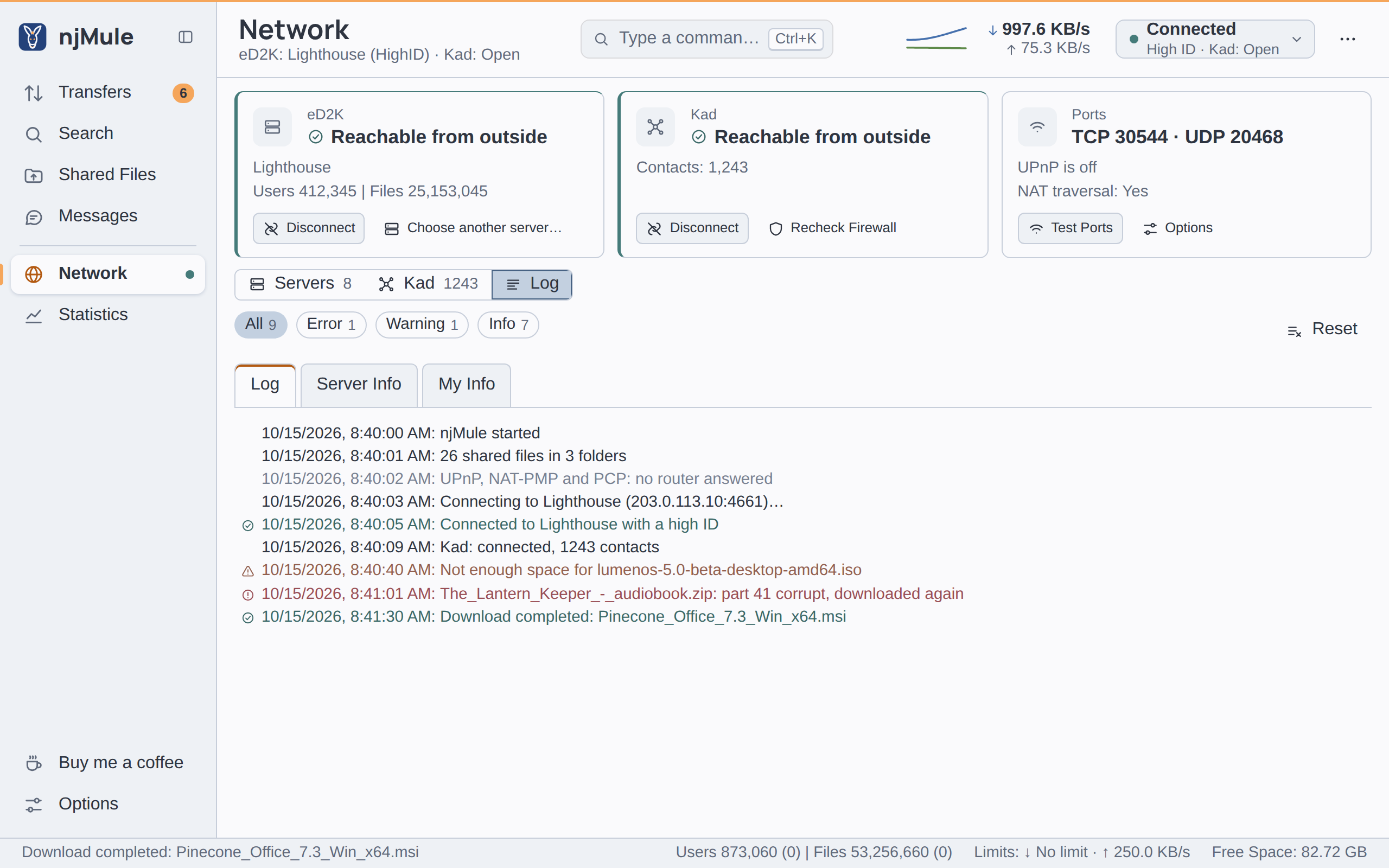
What you see: a banner says Others cannot reach you on port 4662 (LowID): open it in your router, or turn on UPnP in the options. The top bar shows Low ID, and the eD2K card of the network says Not reachable from outside.
Why: the server could not connect back to your client port (TCP). The router does not forward it to your computer, a firewall blocks it, UPnP is off or failed, or another program holds the port. With a LowID you still download, but every client has to reach you through a callback and other LowID clients are often out of reach, so you get fewer sources.
What to do:
- Open Network and choose Test Ports on the ports card. The outcomes come as they are known; see port test.
- Make sure Forward the ports with UPnP is on in Options → Connection. Changes there wait for Apply and reconnect.
- If your router has no UPnP, forward your client port (TCP, 4662 by default) and your UDP port (4672 by default) to this computer by hand, in the router's own settings.
- Allow njMule in the computer's firewall. On Windows the program that listens is
njmule.exe(njmule-gui.exeonly starts it). - Read the log: Cannot listen on TCP port 4662 (…): other clients cannot connect, servers will give a LowID means another program, often an eMule running at the same time, holds the port. Close it or choose other ports.
- In Docker, publish both ports (
-p 4662:4662/tcp -p 4672:4672/udp, or the ports you chose); UPnP does not cross Docker's bridge network, but works with--network host.
If your router itself sits behind another router, or your provider shares one public address among many customers, forwarding in your own router is not enough; ask your provider for a public address. More in Ports and firewalls and NAT traversal.
Kad says firewalled
What you see: the Kad view says Kad is on, but other nodes cannot reach you on port 4662: open it in your router, or turn on UPnP in the options. The state reads Firewalled, or the UDP state UDP firewalled.
Why: Kad nodes tested your ports and could not reach them. Kad tests TCP and UDP separately.
What to do: the same as for a LowID. Then choose Recheck Firewall on the Kad card. The UDP test takes a few minutes. While you are firewalled njMule finds a buddy through which others reach you, so Kad keeps working; see the glossary.
Kad does not connect
What you see: Kad stays Connecting, and the Kad view says Kad is looking for the nodes it knows. If it finds none, give it some below.
Why: Kad starts from the contacts saved in nodes.dat. After njMule has been off for weeks
many of them are gone. Kad also needs outgoing UDP: a network or a proxy that blocks it keeps Kad
from connecting.
What to do:
- Give it a few minutes. njMule also asks the contacts shipped with it, again after a pause of five minutes when they run out, and asks the clients it meets over eD2K that run Kad for contacts.
- Open Network → Kad → Join Kad and give Kad fresh contacts in one of three ways:
- Nodes.dat from URL:, filled in with
https://upd.emule-security.org/nodes.dat, then Download; - Add contacts from nodes.dat... with a file you downloaded yourself;
- From a client you know: its address and UDP port (
host:UDP port), then Bootstrap, for example a friend's eMule.
- Nodes.dat from URL:, filled in with
- Check that Use the Kad network is on in Options → Connection.
- With a proxy, read the proxy entry: Kad's UDP goes through the relay of a SOCKS5 proxy, and waits while that proxy does not answer.
See Servers and Kad.
Kad does not start: its port is in use
What you see: Kad is off although Use the Kad network is on, and a banner says Kad cannot start: another program uses UDP port 4672. njMule tries again every 10 seconds, or choose another port in the options.
Why: another program held the UDP port of Options → Connection when Kad started: often another eMule client, or a second njMule on another profile with the same ports.
What to do: close the other program, or give one of the two another port. njMule tries the port again every 10 seconds and starts Kad once it is free; with a new UDP port in Options → Connection it starts at once. Disconnect on Kad stops the attempts.
No servers
What you see: the server list says No servers yet: add a server.met or connect to an address., or njMule tries every server and starts over every 30 seconds.
Why: a new profile starts with the server list shipped with njMule, but a list emptied later stays empty: you removed all servers, or servers that failed were dropped (Remove dead servers after a number of retries in Options → Server, 1 by default). Other causes: Use the eD2K network is off, Protocol obfuscation is set to Required (servers that cannot take it are left out), or the IP filter blocks the servers.
What to do:
- Open Network → Servers → Add servers.
- In Update server.met from URL, filled in with
https://upd.emule-security.org/server.met, choose Update. You can also choose Add servers from server.met... for a file, or type a server under IP or Address and choose Connect to address. - To refresh the list at every start, tick Auto-update server list at startup in Options → Server and list the addresses with List....
Without servers njMule still works on Kad alone. See Servers and Kad.
The port test fails
The port test (Test Ports, on the Network screen or in Options → Connection) applies the ports as chosen, asks the router again through UPnP, then has a server check the TCP port and Kad nodes check both ports. It can tell:
| Outcome | What it means and what to do |
|---|---|
| TCP 4662: others reach it | Fine. |
| TCP 4662: others cannot reach it; forward it in the router or allow it in the firewall | See Others cannot reach you. |
| TCP 4662: not tested, as no server or Kad node could do it | Connect to a server or to Kad first, then test again. |
| UDP: not tested, Kad is off | The UDP port is tested by Kad nodes only: turn Kad on. |
| Kad's UDP test may take a few minutes. | Wait for it. |
| No router answered through UPnP | The router has no UPnP or has it off: forward the ports by hand. |
| The router at … refused to forward the ports | The router turned the request down; the log names each port with the router's reason. Forward them by hand or choose other ports. |
| The router at … forwards only some of the ports | As above, for the ports that are missing. |
| The router did not answer UPnP properly | Forward the ports by hand. |
The numbers are your own ports. More in Ports and firewalls.
Offline while the VPN is down
What you see: a banner says The network interface … is not available: njMule stays offline until it is back.
Why: Network interface in Options → Connection binds njMule to one interface, such as a VPN's. While it is gone, njMule makes no connection at all, so nothing leaks outside the VPN.
What to do: connect the VPN again: njMule comes back by itself. If you no longer want the binding, set Network interface to Any and choose Apply and reconnect. The list marks an interface that is gone as (not available). See Binding to an interface.
Proxy problems
What you see: nothing connects since you set a proxy, or Kad and global searches stop.
Why and what to do:
- Check Type, Host and port and User name and password in Options → Proxy. A changed proxy waits for Apply and reconnect.
- The proxy carries only the connections njMule opens. Connections that other clients open to you never go through it.
- An HTTP proxy, or a SOCKS proxy that relays no UDP, carries TCP only. The log then says Kad UDP goes straight to the network: …: UDP leaves without the proxy.
- With a SOCKS5 proxy, Kad's and the servers' UDP go through its UDP relay. While the proxy does not answer, the log says Kad UDP is held until the SOCKS5 proxy answers: … and that UDP waits. Check that the proxy is up and allows UDP.
See Proxy.
Transfers
No sources
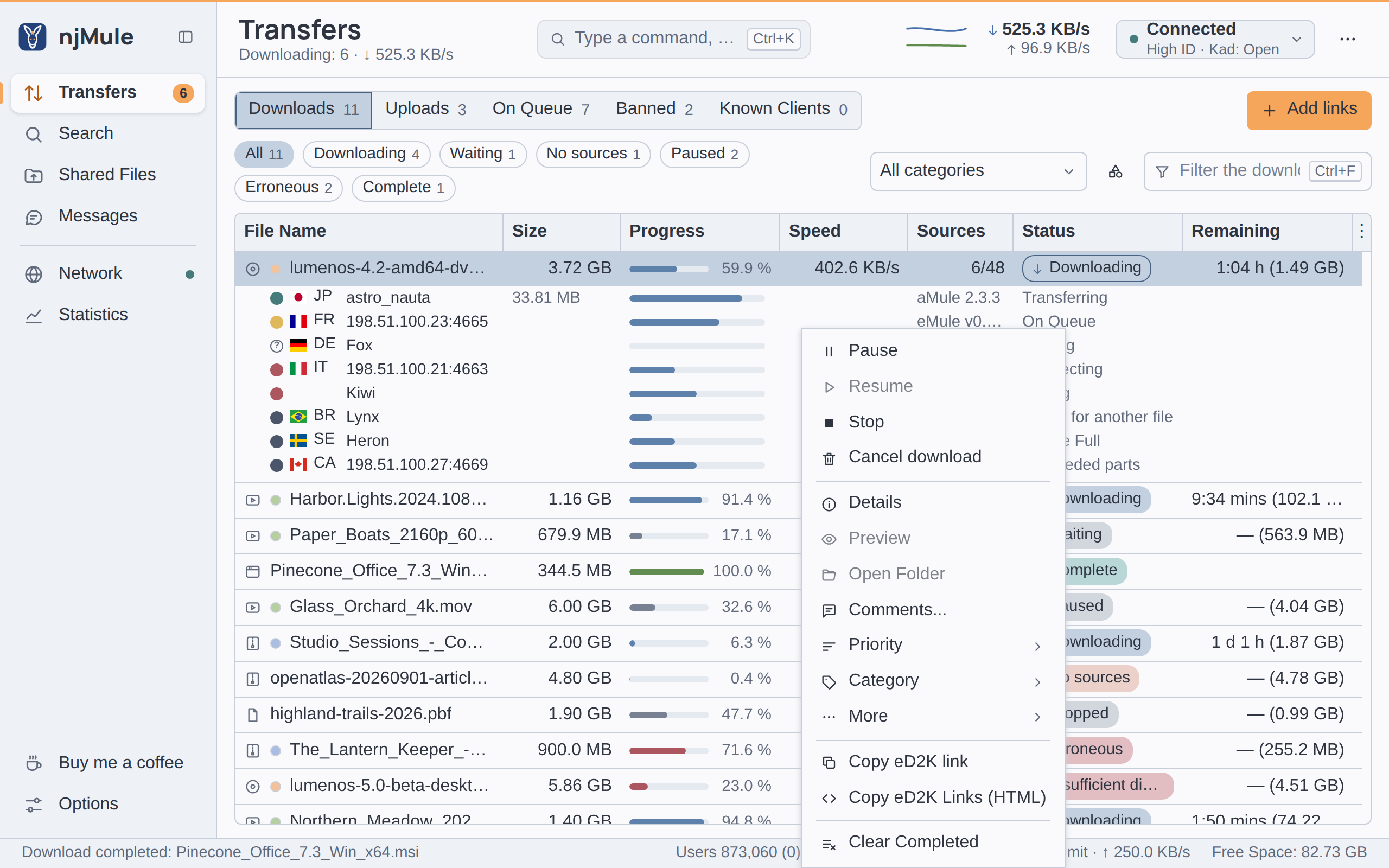
What you see: the download shows No sources, and its details say No source has this file right now: njMule keeps asking the servers and Kad.
Why: nobody who has the file is online now, or njMule cannot see them: it is connected to neither network, or the IP filter blocks them.
What to do: keep the download running and stay connected to both eD2K and Kad: njMule asks the
servers and Kad again by itself, and sources often come back later. If you know a client that has
the file, add it with More → Add Sources... as host:port. A download that never receives
anything can be deleted by itself after a number of days you choose (off by default); see
Transfers.
Downloads stay "Waiting"
What you see: the download has sources but shows Waiting; its sources say On Queue, with a Queue rank.
Why: this is how eD2K shares fairly. Every client uploads to a few others at a time and puts the rest in a queue. The place in it, the queue rank, depends on how long you have waited, on your credits with that client and on the priority it gives the file. Rank 1 is next.
What to do: be patient and keep njMule running: it asks each source again about every 29 minutes and keeps its place. It also helps to:
- be reachable from outside (a HighID), so more sources can connect;
- share files: clients you uploaded to give you credits, which move you up in their queues;
- avoid Stop, which forgets the sources. Pause keeps them, and after a restart njMule takes back the sources that served best (up to 100, for a week).
See credits and queue rank in the glossary.
Insufficient disk space
What you see: downloads show Insufficient disk space, and the log says Not enough free space on the temp disk: downloads wait until there is room.
Why: the disk of the temporary folder has less free space than Min. free disk space [MB] in Options → Directories (512 MiB by default), or a write failed because the disk is full.
What to do: free some space on that disk, or move the temporary folder to another disk with Temporary Files (takes effect at the next start). The downloads go on by themselves once there is room again; the log says There is free space on the temp disk again: downloads go on. The status strip shows the Free Space where downloads go, and a notification can tell you when the temp disk runs short.
Erroneous downloads
What you see: a download shows Erroneous, its details say The file could not be written: resume to try again., and the log says Download … stopped: ….
Why: njMule could not write the data (for a reason other than a full disk), could not open it, or could not move the finished file to the incoming folder. A finished file that another program, such as a virus scanner, holds is moved again after 2, 4, … up to 64 seconds before njMule gives up.
What to do: read the reason in the log (cannot write the data, cannot open the data, cannot move the finished file), fix it (a disk that was removed, missing permissions, a program holding the file), then choose Resume.
Corrupt parts
What you see: a part of a download is downloaded again; the log file says Part … of … is corrupt, downloading it again.
Why: njMule checks every part (9,728,000 bytes) against its hash before keeping it. A part that fails keeps its data and is checked again after each block that comes in again; with AICH recovery data from a source only its bad blocks of 180 KiB are downloaded again. A source that sent corrupt data is found and banned for two hours.
What to do: nothing; this is automatic. If the parts of one file keep failing, the file may be fake: look at its comments and ratings. See AICH.
"Asked for another file"
What you see: a source of a download shows Asked for another file, with a dark grey dot.
Why: that client is a source of several of your downloads, and njMule asks it for one at a time. This is called A4AF.
What to do: usually nothing: njMule moves the client to the download that needs it most. To prefer one download, open its menu, More → Sources shared with other files, and choose Take the sources shared with other files now or Take sources shared with other files whenever possible; Give this file's shared sources to the other files does the opposite. On one source, Ask this source for this file moves only that one; The source cannot move now: it is being asked or sends data means try again shortly. See Transfers.
Web interface
Cannot reach it
Check, in this order:
- It is on. In Options → Web Interface of the desktop app on njMule's computer, Turn the
web interface on and set a password: it follows them at once. Or run
njmule --webui-password, which applies from the next start: restart njMule then. - The address is right. It is plain
http://, nothttps://, on port 4711 unless you changed Port:http://localhost:4711/on the same computer. - Other computers may connect. Without Let other computers connect (otherwise only this
one), or
--webui-lan, it listens on this computer only. From another device use the computer's address, such ashttp://192.0.2.10:4711/. - The firewall lets it in. Allow the port in the computer's firewall. The Windows service's
firewall rule applies on private and domain networks only; on Synology the DSM firewall lists
the port as an njMule service; in Docker publish it with
-p 4711:4711/tcp. - The port is free. The log says Cannot start the web interface on port 4711: … when another program holds it: choose another Port.
See Web interface.
"Unknown host name"
What you see: the browser shows Unknown host name: open the interface by this computer's address, and add the name to the web interface's host names.
Why: against DNS rebinding the web interface answers only to localhost, to IP addresses when
other computers may connect, and to the host names you listed. A name such as nas.local or a
reverse proxy's public name must be listed first.
What to do: open the interface by the address meanwhile, and add the name in the desktop app on
njMule's computer, under Options → Web Interface → Host names. A headless njMule, Docker or
Synology takes it on the command line: --webui-host nas.local (repeat it, or separate names with
commas). A browser cannot change the web interface's settings. Behind nginx, also pass the
browser's host name on with proxy_set_header Host $host;. See
Reverse proxy.
Locked out after wrong passwords
What you see: the sign-in page says Too many attempts: wait a minute.
Why: after five wrong passwords from one address (one /64 network for IPv6) the web interface
refuses that address for a minute. Behind a reverse proxy every sign-in seems to come from the
proxy's address, so one person's wrong passwords lock everyone out.
What to do: wait a minute and try again. Behind a reverse proxy, list it under Trusted
proxies (or --webui-proxy <address>), so that each browser counts on its own. Busy: try again
in a moment. only means other sign-ins are being checked. Wrong passwords are written to the log
with the address they came from. See Web interface security.
Forgotten password
The password is kept only as a hash, so it cannot be read back: set a new one.
- Desktop app: on njMule's computer, Options → Web Interface → New password, twice: it applies at once.
- Command line: run
njmule --webui-passwordand type the new password twice, then restart njMule. Give it the web interface options you use again, such as--webui-lanand--webui-host: it sets them as given, keeping only the port, the API setting and the guest. Add--config-dir <dir>when njMule runs on a profile of its own. - Docker: write the new password in the secret file and restart the container: the secret is the password of every start.
- Windows service:
njmule --service=uninstall(it keeps the profile), thennjmule --service=install --webui-passwordwith your other web interface options; the window that asks for administrator rights asks for the password. See Windows service. - Synology: uninstall the package with the data box left unticked, which keeps its data, then install it again: the install wizard asks for a new password.
Signed out again and again
- A session ends after 30 minutes without use: sign in again.
- Expired session token: reload the page. or Expired form: reload the page.: reload the page.
- The session cookie is marked
Securewhen you signed in over HTTPS, as through a reverse proxy, and the browser then sends it over HTTPS only. Opening the same interface over plainhttp://asks you to sign in again: keep to one address. - Cross-site request refused. means a form came from a name the interface does not know: add that name to the host names, as for Unknown host name.
Two njMule on one computer keep separate sessions: the cookie's name carries the port.
Updates
The update check fails
What you see: the Updates window (⋯ → Check for new version) says The check failed:
…, or njmule --check-update ends with exit code 1.
Why: njMule could not reach GitHub, or what it got was not valid. The check goes through the proxy and the network interface of the options, and njMule believes the update information only when it is signed by a key built into it.
What to do: check the connection, the proxy and the network interface, then try again later. You can always download the new version from the releases page and verify it.
An update went back
What you see: after Restart to update the old version starts again and Updates says the installation of njMule … failed: …, such as it was cancelled, another installation was running or Windows Installer ended with code … with the path of its log.
Why: the new version must start and run for 30 seconds. If it does not, the old files, kept
as *.old until then, are put back and the old version starts again.
What to do: read the reason, fix it, and install the version again from Updates: njMule
never installs again by itself a version whose installation failed. Your configuration was backed
up before the new version first used it; see Backups. When the system's package
manager, the Package Center or Docker installed njMule, install the new version with it (apt,
dnf, Package Center, docker compose pull). More in Updates.
Logs
njMule writes its log to njmule.log in the logs folder. Each day, or at 10 MB, the file moves to
njmule.<date>.<n>.log.gz; 14 days are kept, 200 MB at most.
| Where njMule runs | Logs folder |
|---|---|
| Windows | %LOCALAPPDATA%\njMule\logs |
| macOS | ~/Library/Logs/njMule |
| Linux | ~/.local/state/njmule/logs (or $XDG_STATE_HOME/njmule/logs) |
Portable mode, --config-dir <dir> | logs in that folder |
| Windows service | %ProgramData%\njMule\logs |
| Docker | /njmule/logs in the volume; docker logs njmule shows the console |
| Synology DSM | /var/packages/njmule/var/logs |
| systemd user unit | the folder of Linux above; journalctl --user -u njmule shows the console |
The desktop app and the web interface show the main events in Network → Log, where chips keep
only the errors, warnings or news, and njmule --remote log prints the latest lines when the
remote-control API is on. A window connected to a remote njMule writes no log: that njMule logs on
its own computer. See Logs.
Raise the log level
The levels are ERROR, WARN, INFO (the default), DEBUG and TRACE.
- For one run, start njMule with
--log-level DEBUG:njmule-gui --log-level DEBUGfor the desktop app, which passes it to its engine,njmule --log-level DEBUGheadless. - To keep it, quit njMule and set
log.level=DEBUGinnjmule.properties, in the configuration folder (see Data locations).
Debug logs grow quickly and may hold addresses, user hashes and file names. Set the level back to
INFO when you are done, and remove personal data before you share log lines.
Reporting a bug
Open a bug report on GitHub: github.com/njMule/njMule/issues → Bug report. The form asks for:
| Field | What to give |
|---|---|
| njMule version | The output of njmule --version, or ⋯ → About njMule → Copy version details in the desktop app or the web interface |
| Operating system | Windows, macOS or Linux |
| What happened and what did you expect? | In a few sentences |
| Steps to reproduce | Numbered, from a fresh start when possible |
| Relevant log lines | The lines around the problem, from the log |
Do not paste user hashes, IP addresses, nick names, private file names, passwords or API tokens:
replace them with x before you post. Security problems are never reported in public; follow the
security policy instead.