Web Interface
The Web Interface page of the desktop app turns on njMule's web interface,
the same app in a browser, and the remote-control API that answers beside it. You set its port,
whether other computers may connect, the names and proxies it trusts, your password and a guest's.
The page says it: The web interface follows these settings at once, at http://localhost:<port>/
on this computer. Only the desktop app on the computer njMule runs on changes them; see
In the web interface.
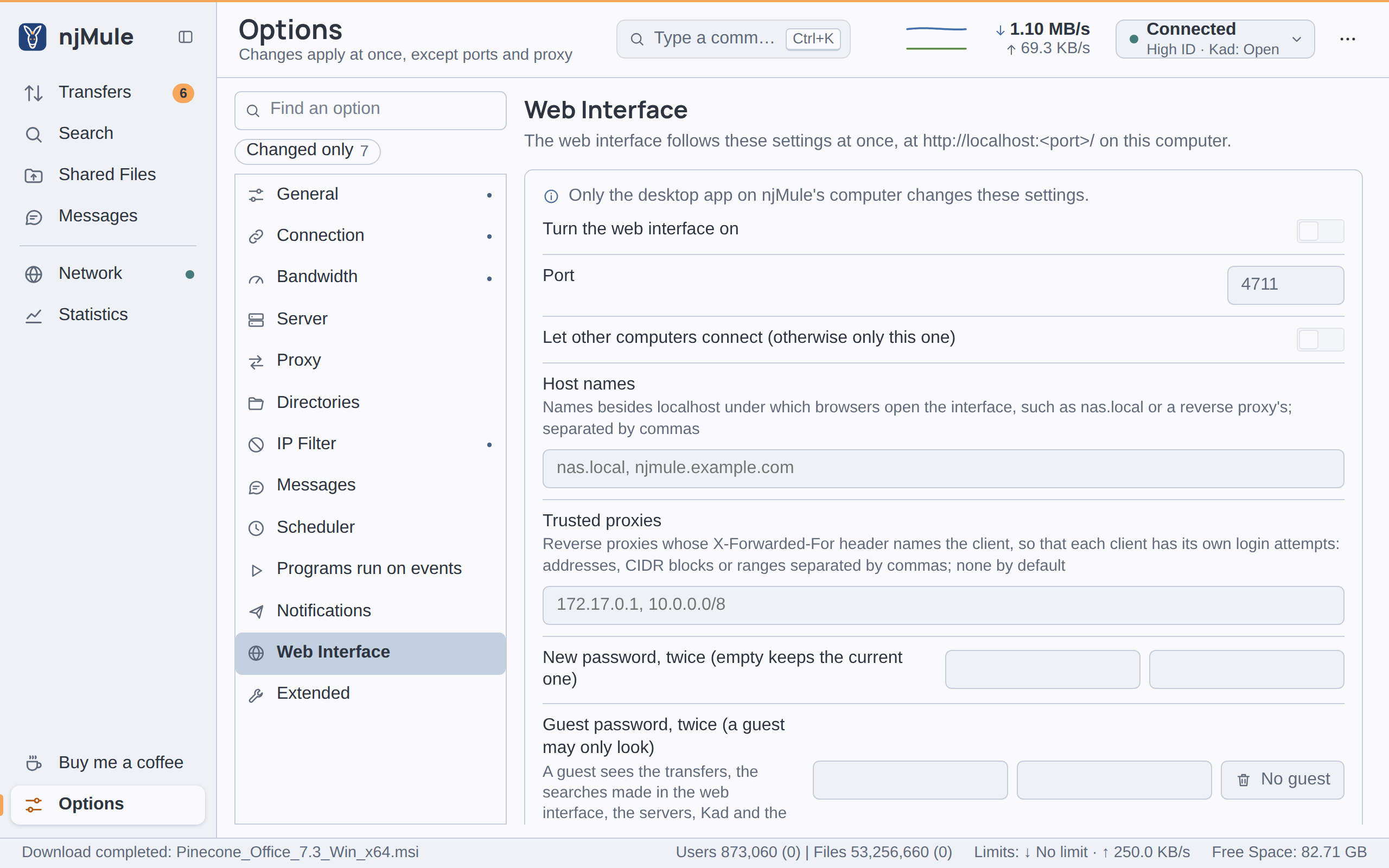
These settings are kept in webui.properties in the configuration folder, apart from the engine's,
and saved as soon as you set them; the web interface follows them at once: it starts, stops, or
starts again with them, which signs out the browsers using it. Without the desktop app, the same
settings are made with the command line, from the next start of njMule.
Options
| Option | Default | What it does |
|---|---|---|
| Turn the web interface on | Off | Starts the web interface with njMule, headless or with the desktop app. It needs a password: turned on without one, the switch stays on screen and says Not saved: the web interface needs a password, and is saved once you set the password. Key enabled. |
| Port | 4711 | The port of the web interface and of the API, a whole number from 1 to 65535. Key port. |
| Let other computers connect (otherwise only this one) | Off | Off, the web interface listens on this computer only (localhost). On, it listens on every address, so that other devices of your network reach it, and it also answers to IP addresses and to the Synology QuickConnect name of the address it was reached at. Key lan. |
| Host names | none | Names besides localhost under which browsers open the interface, such as nas.local or the public name of a reverse proxy, apart by commas. Other names are refused, against DNS rebinding. A name in ASCII (an international one in its xn-- form), without a port or a scheme. Key hosts. |
| Trusted proxies | none | Reverse proxies whose X-Forwarded-For header names the client, so that each client has its own login attempts: addresses, CIDR blocks or ranges (172.17.0.1, 10.0.0.0/8, 10.0.0.1-10.0.0.9), apart by commas. Host names are refused. Key proxies. |
| New password, twice (empty keeps the current one) | none | Your password for the web interface: at least 8 characters, typed the same in both fields. It is saved, as a hash, once both fields agree and you leave them; the fields then empty again and njMule says Settings saved. Key password (the hash). |
| Guest password, twice (a guest may only look) | none | A second password, for a guest who sees the transfers, the searches made in the web interface, the servers, Kad and the statistics, and changes nothing. At least 8 characters, typed twice, and different from yours. No guest removes it. Key guestPassword (the hash). |
| Answer the remote-control API too (njmule --remote; callers need its token) | Off | Lets the same server answer the JSON API under /api/v1, to callers who send its token. Key api. |
| Copy the API token | — | Copies the token of the API to the clipboard, making one the first time. |
| New API token | — | Makes a new token and copies it: whoever holds the old one is refused from now on. |
The token is kept in the api-token file of the configuration folder. The passwords are kept only
as hashes, in a file only your user can read on Linux and macOS.
The web interface is served over plain HTTP. Let other computers connect only on a network you trust, or reach it through a reverse proxy that serves HTTPS: see Behind a reverse proxy and Security.
Guest access and Remote control tell more about the guest and the API.
In the web interface
The web interface has the same Web Interface page in its Options, but there every setting and button is greyed out, under the note Only the desktop app on njMule's computer changes these settings. The same holds in a desktop app connected to the njMule of another computer: a browser or a remote window can neither open the web interface wider nor take the API token. Change these settings in the desktop app on the computer njMule runs on, or with the command line.
From the command line
On a server, or to script it, the same settings are made with njmule (see
Command line):
| Option | Command line |
|---|---|
| Turn the web interface on and the password | --webui-password asks for the password twice and turns the interface on; --webui-password-file <file> takes it from the first line of a file |
| Port | --webui-port <port> |
| Let other computers connect | --webui-lan |
| Host names | --webui-host <name>, repeated or apart by commas |
| Trusted proxies | --webui-proxy <address>, repeated or apart by commas |
| Answer the remote-control API too | --webui-api |
| Copy the API token | --api-token prints it |
| New API token | --new-api-token replaces it and prints the new one |
The options of the web interface go with --webui-password or --webui-password-file, for example:
njmule --webui-password --webui-port 4711 --webui-lan --webui-host nas.local