Scheduler
The Scheduler changes njMule's limits at the times you choose: slower uploads during office hours, no download limit at night, fewer connections at the weekend. Each rule has days of the week, a window of time and the limits it sets; when it begins, it can also stop the downloads of one category and resume those of another. The web interface has the same page.
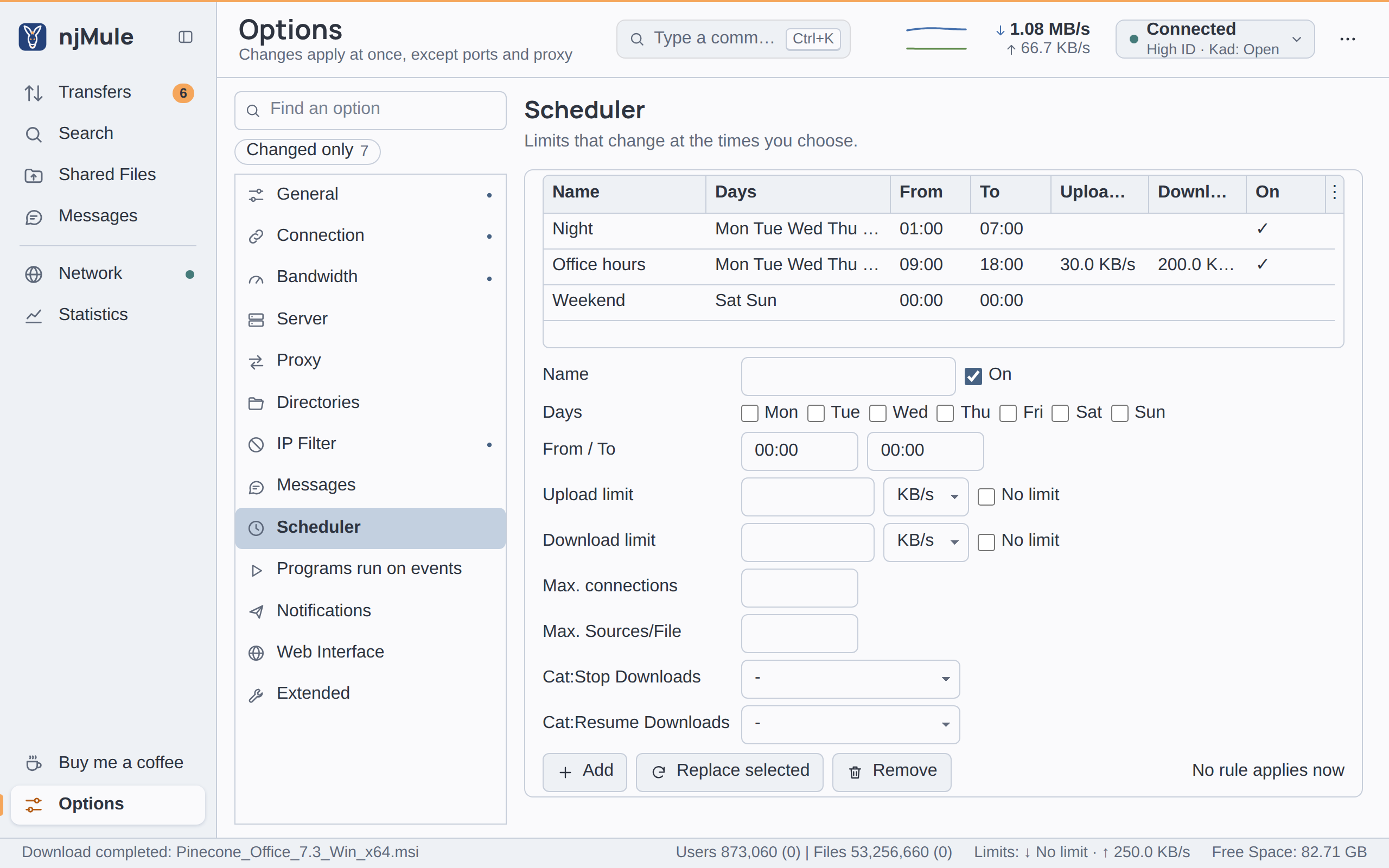
The rules
The list shows each rule with its Name, Days, From and To times, Upload limit, Download limit and whether it is On. Beside the buttons under the form, njMule says which rule applies now, as Now: Office hours, or No rule applies now. With no rules, the list says No rules: the preferences always apply.
A rule applies as soon as you add, replace or remove it; there is nothing else to save.
Add a rule
- Fill in the form under the list: name, days, times and the values the rule sets.
- Click Add. The rule goes to the end of the list.
Change or remove a rule
- Click the rule in the list: the form shows its values.
- Change them and click Replace selected, or click Remove to delete the rule.
Add and Replace selected stay off while a field of the form holds a wrong value.
The form of a rule
| Field | Default | What it does |
|---|---|---|
| Name | empty | A name of your choice, shown in the list and in Now:. Up to 100 characters. |
| On | ticked | Only a rule that is on applies; untick it to keep a rule without using it. |
| Days | none | The days of the week the rule starts on. A rule with no day ticked never applies. |
| From / To | 00:00 / 00:00 | The window of the rule, as hh:mm in 24-hour time. When To is earlier than From, the window runs past midnight into the next day. When they are equal, the rule holds the whole day. |
| Upload limit | empty | The upload limit during the window, in KB/s or MB/s, or No limit. Empty leaves the limit of the options. |
| Download limit | empty | The download limit during the window, in the same way. |
| Max. connections | empty | The most connections open at once during the window: a whole number from 1 to 10,000. Empty leaves the option's value. |
| Max. Sources/File | empty | The most sources of one download during the window: a whole number from 1 to 10,000. Empty leaves the option's value. |
| Cat:Stop Downloads | - | When the rule begins, stops the downloads of this category. - stops none; Uncategorized means the downloads in no category. |
| Cat:Resume Downloads | - | When the rule begins, resumes the paused and stopped downloads of this category. |
How rules apply
- The first rule that holds wins. njMule goes down the list in order and takes the first rule that is on and whose window holds now; put the most specific rules first.
- A rule replaces the options, it does not change them. While it holds, its values take the place of the limits of Bandwidth and Connection; a field left empty keeps the option's value. The options stay as you set them and apply again as soon as no rule holds. A limit you set meanwhile from the top bar changes the options, which the rule still overrides until it ends.
- The times are the local time of the computer njMule runs on.
- A window past midnight belongs to the day it starts on. A rule from
22:00to06:00with only Friday ticked holds from Friday 22:00 to Saturday 06:00. - Categories are acted on once, when the rule begins. Nothing is stopped or resumed again while it holds, nor undone when it ends. Editing a rule while it holds does not repeat its actions.
The log says when a rule begins (Scheduler: "Night" applies now), which categories it stopped or resumed, and when the options apply again (Scheduler: the preferences apply again).
Where the rules are kept
The rules are kept in scheduler.properties in the configuration folder, one group of rule.N.*
keys per rule, in the order of the list. A rule that cannot be read is left out, and the log says
so. A field left empty has no key. For example:
# njMule scheduler
rule.1.name=Night
rule.1.enabled=true
rule.1.days=MONDAY,TUESDAY,WEDNESDAY,THURSDAY,FRIDAY
rule.1.start=01:00
rule.1.end=07:00
rule.1.downloadKiBps=0
rule.2.name=Office hours
rule.2.enabled=true
rule.2.days=MONDAY,TUESDAY,WEDNESDAY,THURSDAY,FRIDAY
rule.2.start=09:00
rule.2.end=18:00
rule.2.uploadKiBps=30
rule.2.downloadKiBps=200
rule.2.stopCategory=2
The limits are in KiB/s, 0 for no limit. The categories are their numbers, 0 for the downloads
in none (see Categories).