Notifications
The Notifications page has njMule tell you of what happens while you are away: an e-mail through your own mail server, a message to a web hook such as an ntfy topic or a Gotify server, or both. You choose which events are told: a completed or failed download, a chat message, or a temporary disk short of space. Both ways are off by default. The engine sends them, so they work with the headless njMule too, and the web interface has the same page. They take the route of njMule's other connections: through the proxy and from the network interface of the options, and none is sent while that interface is gone.
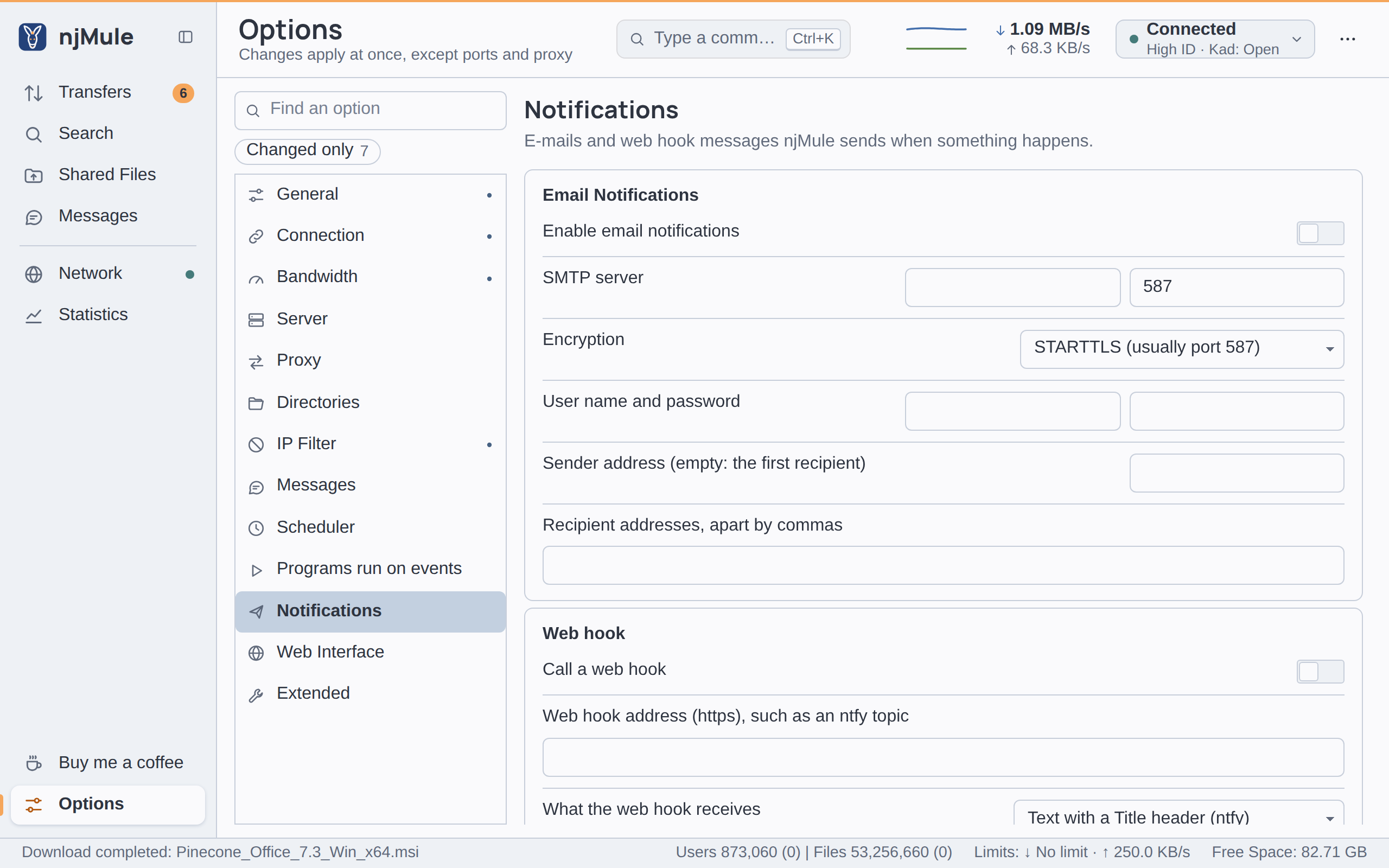
Every option of this page applies at once and is kept in njmule.properties under notify.*.
Each row is marked Changed when what it shows differs from the default, and its Reset link
puts back that row alone.
The sound of the desktop app's own notifications is on the General page; programs of your own are on Programs run on events.
Email Notifications
| Option | Default | What it does |
|---|---|---|
| Enable email notifications | Off | Sends an e-mail for each event chosen under Tell of. Key notify.email. Also in the web interface. |
| SMTP server | empty, 587 | The host name or IP address of your outgoing mail server, required while e-mails are on, and its port, a whole number from 1 to 65535. Keys notify.smtpHost and notify.smtpPort. Also in the web interface. |
| Encryption | STARTTLS (usually port 587) | How the connection to the server is encrypted: STARTTLS (usually port 587), or TLS from the start (usually port 465). Choosing one does not change the port: set the one your provider gives. Key notify.smtpSecurity: STARTTLS or TLS. Also in the web interface. |
| User name and password | empty | The login of your mail account; with no user name njMule sends without logging in. Up to 255 characters each. Keys notify.smtpUser and notify.smtpPassword. Also in the web interface. The stored password is never shown: its field shows dots while one is set, and what you type over them replaces it. |
| Sender address (empty: the first recipient) | empty | The address the e-mails come from. Key notify.mailFrom. Also in the web interface. |
| Recipient addresses, apart by commas | empty | Where the e-mails go: one address, or several apart by commas. Up to 255 characters. Key notify.mailTo. Also in the web interface. |
njMule never sends an e-mail in the clear. With STARTTLS the server must switch to encryption before anything is sent, or the e-mail fails; with TLS the connection is encrypted from the start. In both cases njMule checks that the server's certificate is for the name you typed. Many providers ask for an app password, made in your account's security settings, instead of your usual password.
The SMTP password is kept in njmule.properties as you typed it, and never leaves njMule through the
remote-control API.
Web hook
| Option | Default | What it does |
|---|---|---|
| Call a web hook | Off | Sends a request to the address below for each event chosen under Tell of. Key notify.webhook. Also in the web interface. |
| Web hook address (https), such as an ntfy topic | empty | The address of the web hook: https only, at most 2,048 characters. Key notify.webhookUrl. Also in the web interface. |
| What the web hook receives | Text with a Title header (ntfy) | Text with a Title header (ntfy): the text of the message as the body, its title in a Title header. JSON with title and message (Gotify): a JSON object with title and message. Key notify.webhookBody: TEXT or JSON. Also in the web interface. |
njMule sends a POST request and counts any answer from 200 to 299 as delivered. For example:
- ntfy: the address of your topic, such as
https://ntfy.sh/your-topic, with Text with a Title header (ntfy). Anyone who knows the name of a topic on a public server can read it: choose a name hard to guess, or use a server of your own. - Gotify: the message address of your server with the token of an application made there, such
as
https://gotify.example.com/message?token=…, with JSON with title and message (Gotify).
The JSON body looks like this:
{
  "title": "njMule: Download completed",
  "message": "Harbor.Lights.2024.1080p.mkv (1188.3 MiB) is complete:\nC:\\Users\\you\\Downloads\\njMule\\Harbor.Lights.2024.1080p.mkv"
}
Events and test
| Option | Default | What it does |
|---|---|---|
| Tell of | Download completed, Download failed, Temp disk short of space | The events that send a notification, through each way that is on: Download completed, Download failed, New chat message and Temp disk short of space. Key notify.events, the events apart by commas: downloadCompleted, downloadFailed, chatMessage, diskSpaceShort. Also in the web interface. |
| Test | — | Sends a test message, njMule: Test, through each way that is on, and says for each whether it was sent, or why not. It first applies what you typed on the page. With both ways off it says Turn on the e-mail or the web hook first. Also in the web interface. |
A chat message left out by the message filters sends no notification.
What the messages say
Each message has a title starting with njMule: and a short text, in English:
| Event | Title | Text |
|---|---|---|
| Download completed | njMule: Download completed | The name and size of the file, and where it is. |
| Download failed | njMule: Download failed | The name of the file and why it failed. |
| New chat message | njMule: Chat message | Who wrote, and the message. |
| Temp disk short of space | njMule: Disk space short | That the downloads wait, and which folder is short of space. |
Limits
- At most ten notifications go out in ten minutes; the next ones are dropped until the ten minutes have passed, and the log says so once. A flood of chat messages never becomes a flood of e-mails.
- At most two messages are on their way at once; one more is dropped, with a line in the log.
- njMule gives up on a server or web hook that does not answer within 30 seconds, and logs why.