General
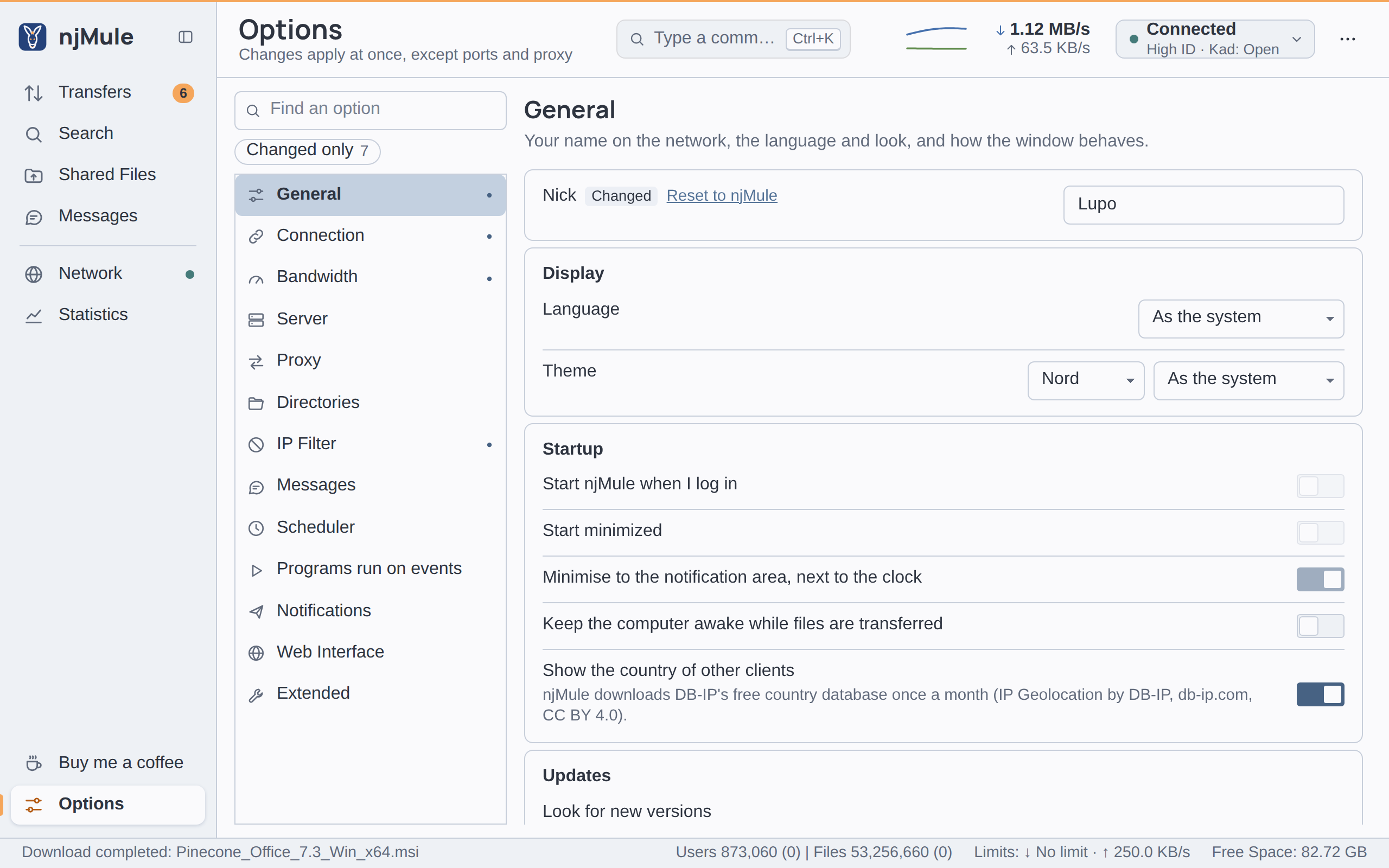
The General page holds your name on the network, the language and look of the desktop app, what happens when you log in and when you close the window, how njMule looks for new versions of itself, and the sound of its notifications. Most of it is about the desktop app; the nick, the update options, keeping the computer awake and the countries of other clients are also on the General page of the web interface.
Unless the table says otherwise, an option is kept in njmule.properties under the key given, and
applies at once (see When a change applies).
Nick
| Option | Default | What it does |
|---|---|---|
| Nick | njMule | Your name on the eD2K network: other users see it in their lists of sources, uploads and chats. From 1 to 50 characters; control characters and the marks that change the direction of text are refused. Key user.nick. Also in the web interface. |
Display
| Option | Default | What it does |
|---|---|---|
| Language | As the system | The language of the desktop app: As the system, or one of its 36 languages, each named in its own words. As the system follows the language of your system when njMule has it, and English otherwise. Waits for Apply and restart, which starts the app again. Kept by the interface itself, not in a file of the engine. Also in the web interface, where each browser keeps its own. |
| Theme | Nord, As the system | Two lists: the theme (Nord, Primer, Cupertino or Dracula) and its mode (Light, Dark or As the system, which follows the light or dark setting of your system). Applies at once. Kept by the interface itself, as the language is. Also in the web interface, where each browser keeps its own. |
While Windows high contrast is on, the desktop app takes the system's colours instead of the theme. Appearance shows the themes.
Startup
| Option | Default | What it does |
|---|---|---|
| Start njMule when I log in | Off | Starts the desktop app when you log in to your computer: through your Run key on Windows, an XDG autostart entry on Linux, or a launch agent on macOS. njMule reads the setting back from the system each time, so it stays right if you change it elsewhere. Only the installed app can do it: in a development build the switch is off and says why. Not kept in a file. Desktop only. |
| Start minimized | Off | Opens the window minimised; with the option below on Windows, njMule starts as an icon in the notification area. Key startMinimized in desktop.json. Desktop only. |
| Minimise to the notification area, next to the clock | On | Minimising the window hides it into an icon in the Windows notification area. Shown only on Windows. Key minimizeToTray in desktop.json. Desktop only. See Notification area. |
| Keep the computer awake while files are transferred | Off | Keeps the computer from going to sleep while files are downloaded or uploaded, and lets it sleep again two minutes after the last transfer. njMule uses the Windows launcher of the desktop app, caffeinate on macOS and systemd-inhibit on Linux, which all end with njMule anyway. Key system.preventSleep. Also in the web interface. |
| Show the country of other clients | On | Shows the country of other clients, with its flag, in the sources of a download, among the uploads and the queue, and in the known clients, the country of each server in the servers' list and of each Kad contact. njMule then downloads DB-IP's free country database once a month (IP Geolocation by DB-IP, CC BY 4.0). Key geo.countries. Also in the web interface. See Privacy. |
Updates
njMule asks GitHub whether a new version is out, through the proxy and the network interface of the options, and believes the answer only when it is signed by a key built into njMule. The request carries nothing but njMule's version. Updates tells the whole story.
| Option | Default | What it does |
|---|---|---|
| Look for new versions | At each start and every day | Only when I ask, At each start and every day (tells you of a new version), At each start and every day, and download them, or At each start and every day, and install them. Where a package manager, the Synology Package Center or Docker installs njMule, it cannot replace itself: the last choice then only downloads, and njMule tells you how to install, as the line under the option says. Key update.mode: OFF, NOTIFY, DOWNLOAD or INSTALL. Also in the web interface. |
| Versions | Test versions too in a test version, Releases only in a release | Releases only, or Test versions too (alpha, beta and release candidates as well). A release such as 0.3.1 looks for releases only by default, a test version for test versions too. Key update.channel: STABLE or PRERELEASE. Also in the web interface. |
| Install them | When I close njMule | When a version downloaded is installed: When I close njMule, or When I close njMule, or in the night hours, for a computer left on for days. Only with …and install them above. Key update.installAt: EXIT or EXIT_OR_NIGHT. Also in the web interface. |
| Night hours | 03:00-05:00 | The hours when njMule may restart by itself to install a new version it downloaded, written hh:mm-hh:mm in 24-hour time. The hours may run past midnight (23:30-01:30), but must not start when they end. Only with …or in the night hours above. Key update.nightHours. Also in the web interface. |
| Check for new version | — | Check looks at once, whatever the choice above, and shows the answer in the Updates window. The web interface has a Check for new version button under the options. |
Miscellaneous
| Option | Default | What it does |
|---|---|---|
| Prompt on exit | On | Asks before closing njMule. Ticking Do not ask me again in that question turns this option off; turn it on here to be asked again. Key confirmExit in desktop.json. Desktop only. |
| Watch clipboard for eD2K file links | Off | ed2k file links you copy in any program are offered as downloads, after a confirmation. Key watchClipboard in desktop.json. Desktop only. See ed2k links. |
| Open ed2k links with njMule (from browsers and other programs) | Off | Makes njMule the program that opens ed2k:// links on Windows and Linux, remembering which program did before; turning it off gives the links back to that program. Shown only for the installed desktop app on Windows and Linux. njMule reads the setting back from the system each time. Desktop only. |
The uninstaller gives the ed2k links back when njMule still has them; njmule --restore-links does
it by hand (see the command line).
Notifications
These two options are about the sound of the desktop app's own notifications. E-mails and web hook messages are on the Notifications page; programs of your own are on Programs run on events.
| Option | Default | What it does |
|---|---|---|
| Play a sound with the notifications of completed downloads and new messages | Off | Plays the sound file below when a download completes, and when a chat message arrives while the Messages screen is not shown. Key notify.sound. Desktop only. |
| Sound file (WAV, MP3) | empty | The full path of a WAV or MP3 file, typed or chosen with Browse...; Test plays it. Nothing plays while it is empty, even with the switch on. Key notify.soundFile. Desktop only. |