Directories
The Directories page says where downloads go and what happens to them: the folders of finished and unfinished downloads, the free space njMule keeps on the disk, how new downloads start and are named, which files njMule remembers, when an idle download is deleted, how a download is previewed, and who may see the list of your shared files. The web interface has the same page.
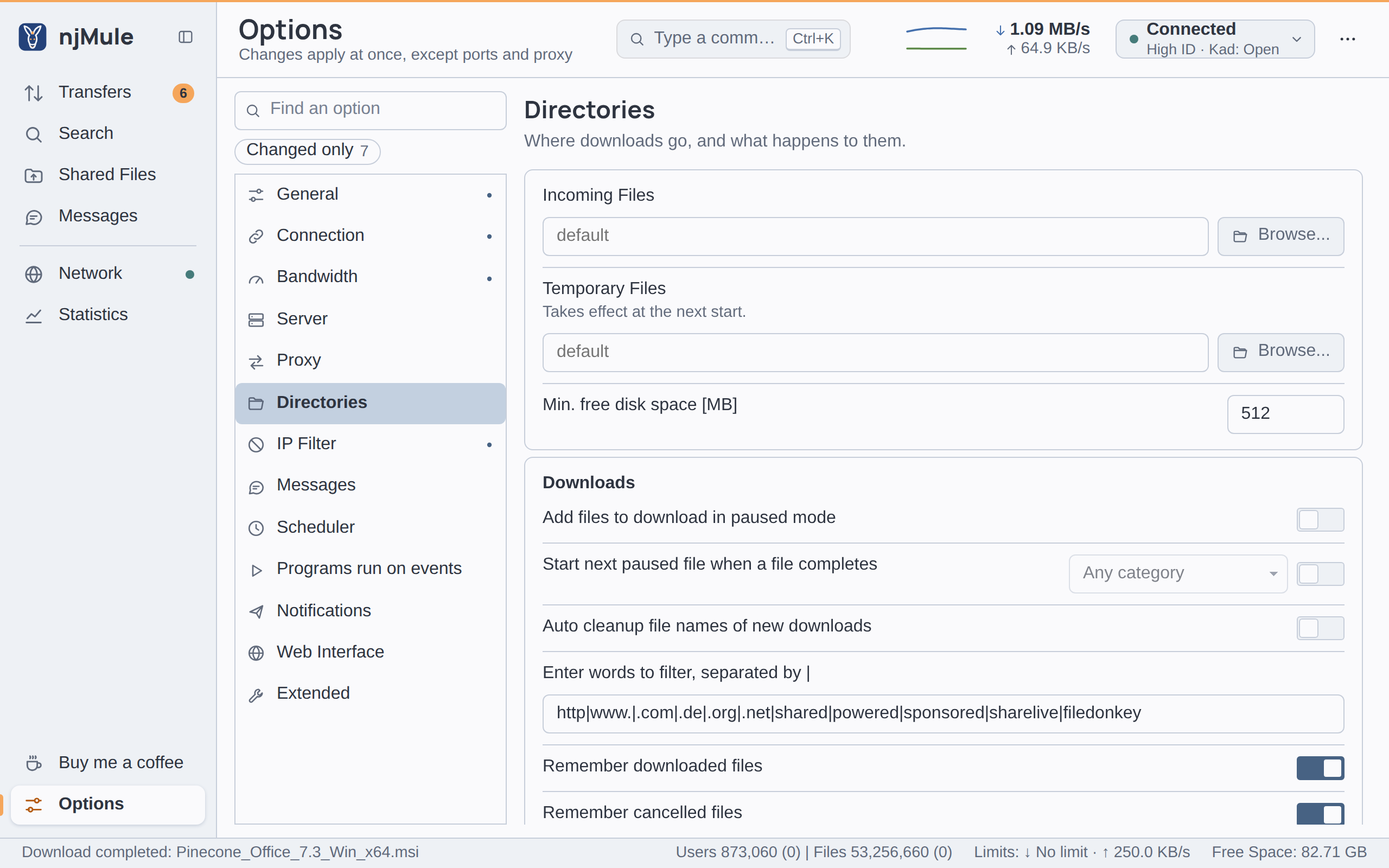
Every option of this page is kept in njmule.properties and applies at once, except the temporary
folder. The folders you share are chosen on the Shared Files screen.
Folders
| Option | Default | What it does |
|---|---|---|
| Incoming Files | empty: the default folder | Where finished downloads go, from the next one that completes. Type the path of a folder or choose it with Browse...; it need not exist yet, but must not be a file. Empty for the default, njMule in your Downloads folder. Key dirs.incoming. Also in the web interface. |
| Temporary Files | empty: the default folder | Where unfinished downloads are kept (their .part and .part.met files). Takes effect at the next start. Empty for the default temp folder of the profile. Key dirs.temp. Also in the web interface. |
| Min. free disk space [MB] | 512 | Downloads wait while the disk of the temporary folder has less free space than this, in MiB, and go on by themselves once there is room again. A whole number from 0 to 10,000,000; 0 never waits. Key download.minFreeSpaceMiB. Also in the web interface. |
The folders are folders of the computer njMule runs on. Browse... opens the system's folder dialog in the desktop app on that computer; in a browser, type the path.
Locations lists the default folders on each system. Changing the temporary folder does not move the downloads already in the old one: stop njMule and move them yourself before it starts again on the new folder.
When the disk runs short, the downloads show it, and njMule can tell you by e-mail or web hook or run a program of yours (Temp disk short of space).
Downloads
| Option | Default | What it does |
|---|---|---|
| Add files to download in paused mode | Off | New downloads are added paused, to start when you resume them. Key download.addPaused. Also in the web interface. |
| Start next paused file when a file completes | Off, Any category | When a download completes or is cancelled, a paused one starts, the one of highest priority first. The list beside the switch says which: Any category, Prefer same category (one of the same category, else any) or Only in same category. Key download.startNext: NONE, ANY, SAME_CATEGORY_FIRST or SAME_CATEGORY. Also in the web interface. |
| Auto cleanup file names of new downloads | Off | New downloads get a tidy name as they are added: escapes, dots and underscores used as spaces, tags in square brackets and the words of the list below go, and each word starts with a capital. Key files.cleanUpNewNames. Also in the web interface. |
| Enter words to filter, separated by | | see below | The words the clean-up takes out of file names, apart by |, used by the option above and by the clean-up of the names of a download. At most 4,096 characters. Key files.nameCleanups. Also in the web interface. |
| Remember downloaded files | On | Keeps a record of the files you downloaded, even once you no longer share them, so that search results show them as already downloaded. Turned off, njMule forgets the files it no longer shares. Key files.rememberDownloaded. Also in the web interface. |
| Remember cancelled files | On | Keeps a list of the downloads you cancelled, so that search results show them as cancelled. Turning it off empties the list. Key files.rememberCancelled. Also in the web interface. |
| Delete downloads that receive nothing for (days, 0 = never) | 0 | A download that receives no data for this many days is deleted by itself. See Idle downloads. A whole number from 0 to 365; 0 never deletes. Key download.autoDeleteDays. Also in the web interface. |
The default words of the clean-up are:
http|www.|.com|.de|.org|.net|shared|powered|sponsored|sharelive|filedonkey
Idle downloads
With Delete downloads that receive nothing for set to a number of days, njMule counts how long each download runs without receiving anything:
- only the time the download runs counts, while njMule is connected to an eD2K server or to Kad, and while there is room on the disk;
- any data received starts the count again from zero;
- paused and stopped downloads are never deleted, and their count waits;
- the count is kept in the download's
.part.met, so it goes on across restarts.
Before deleting a download, njMule writes its ed2k link to deleted-downloads.txt in the profile
folder, so that you can add it again at will; when the link cannot be written, the download stays
and counts again.
Preview
| Option | Default | What it does |
|---|---|---|
| Try to download preview chunks first | Off | Every download that can be played fetches its first and last parts first, so that it can be previewed early. One download can do the same from its own menu. Key download.previewFirst. Also in the web interface. |
| Video Player | empty | The program Preview opens a download with, typed or chosen with Browse..., then its arguments in the small field beside it. njMule starts the program with the arguments, apart by spaces, then the path of the data downloaded so far, without a shell. Keys preview.player and preview.args. Also in the web interface, typed only; Preview starts the player only in the desktop app on the computer njMule runs on. |
An argument of the player cannot hold a space. With no player set, Preview says so.
Shared Files
| Option | Default | What it does |
|---|---|---|
| See My Shared Files/Directories | Nobody | Who may see the list of your shared files when they ask for it: Everybody, Friends or Nobody. Your files are shared whatever you choose; this is only about the list. Key share.visibleTo: EVERYBODY, FRIENDS or NOBODY. Also in the web interface. |