Connection
The Connection page says how njMule reaches the eD2K and Kad networks: the ports other clients connect to, whether the router is asked to forward them, which networks are used, how connections are obfuscated, which network interface they go through, and how many may be open. The web interface has the same page.
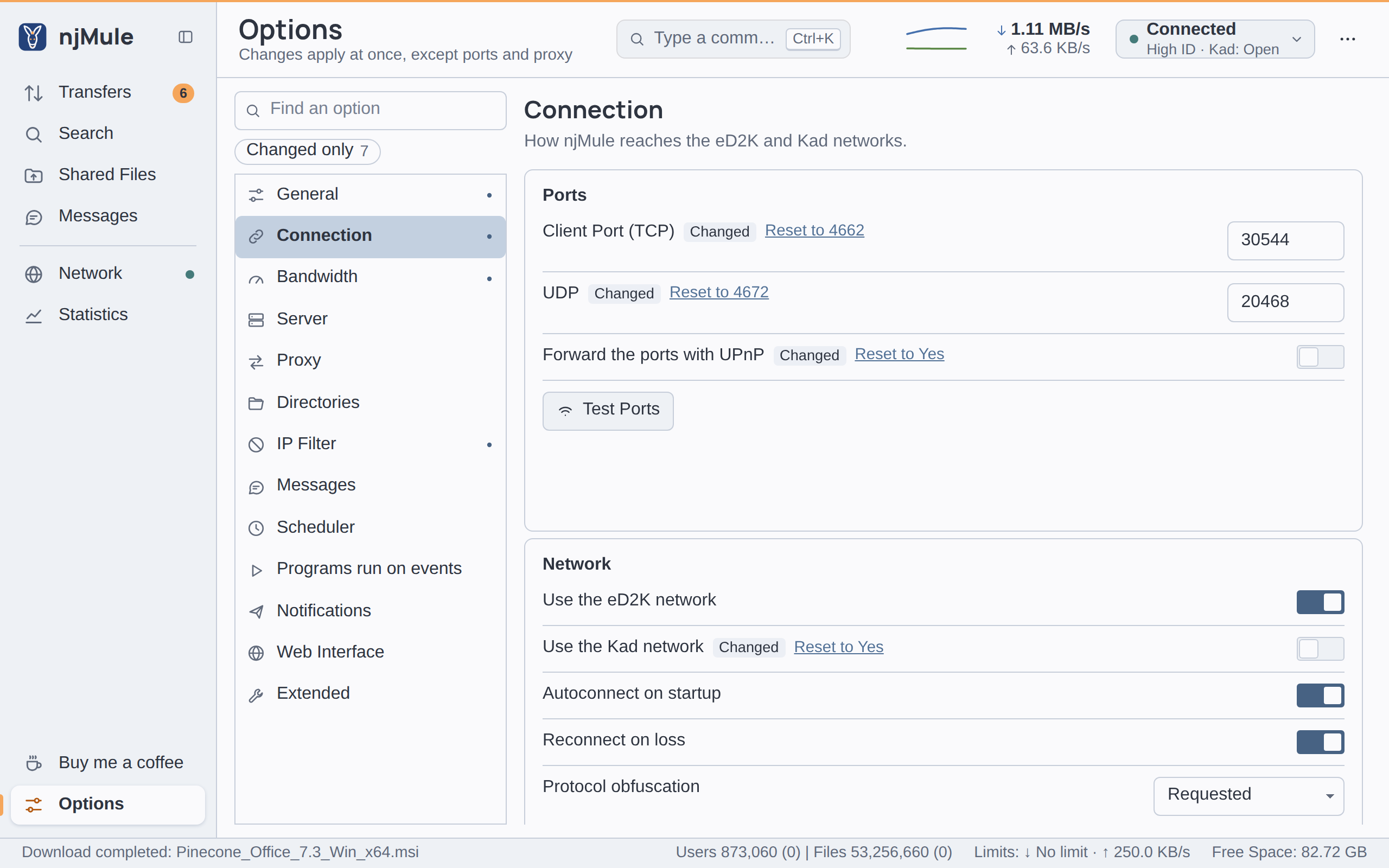
The ports, UPnP and the network interface wait for Apply and reconnect (see
When a change applies); the other options apply at once. The keys
are those of njmule.properties.
Ports
| Option | Default | What it does |
|---|---|---|
| Client Port (TCP) | 4662 | The TCP port other clients connect to. A server checks it when you log in and gives a HighID only when it is reachable. A whole number from 1 to 65535. Waits for Apply and reconnect. Key net.tcpPort. Also in the web interface. |
| UDP | 4672 | The UDP port of Kad and of the messages between clients (re-asks, connections through routers). A whole number from 1 to 65535. Waits for Apply and reconnect. Key net.udpPort. Also in the web interface. |
| Forward the ports with UPnP | On | Asks the router to forward both ports to this computer while njMule runs, renewing the forwarding and removing it at exit. A router that answers no UPnP is asked through NAT-PMP or PCP. Waits for Apply and reconnect. Key net.upnp. Also in the web interface. |
| Test Ports | — | Checks whether others reach your ports. See below. Also in the web interface, and on the Ports card of the Network screen. |
When you apply new ports, njMule listens on them at once, logs in to the server again so that it checks the new TCP port, restarts Kad on them and asks the router again; no restart is needed. Ports and firewalls explains which ports to open and why.
Port test
Test Ports first applies the ports and the UPnP switch as they are in the fields, without waiting for Apply and reconnect, then:
- asks the router again through UPnP, and says whether it forwards the ports;
- logs in to a server again, which checks the TCP port;
- asks Kad nodes to check both ports.
Each line says what it found as it comes: the router, then TCP and UDP with others reach it, or others cannot reach it; forward it in the router or allow it in the firewall. Kad's UDP test may take a few minutes; with Kad off, UDP is not tested.
Network
| Option | Default | What it does |
|---|---|---|
| Use the eD2K network | On | Uses eD2K servers. Turning it off leaves the server you are connected to, and njMule connects to none until you turn it on again. Key net.ed2k.enabled. Also in the web interface. |
| Use the Kad network | On | Uses Kad. Turning it on starts Kad at once; turning it off stops it. Key net.kad.enabled. Also in the web interface. |
| Autoconnect on startup | On | Connects to a known eD2K server when njMule starts, while eD2K is on. Kad starts by itself whenever it is on. Key net.autoConnect. Also in the web interface. |
| Reconnect on loss | On | Connects to a server again when the connection to the server is lost. Key net.reconnect. Also in the web interface. |
| Protocol obfuscation | Requested | How njMule hides its eD2K and Kad traffic from simple inspection: Disabled, Supported, Requested or Required; see Obfuscation modes. Applies at once. Key security.obfuscation: DISABLED, SUPPORTED, REQUESTED or REQUIRED. Also in the web interface. |
| Network interface | Any | The network interface every connection goes through. Connections go only through this interface. If it goes away, for example when a VPN drops, njMule stays offline until it is back. See Network interface. Waits for Apply and reconnect. Key net.bindInterface. Also in the web interface. |
Obfuscation modes
Obfuscation encrypts the eD2K and Kad traffic so that it is harder to recognise and throttle. It works only with clients and servers that support it, which most do. Each mode tells the others what njMule supports, asks or requires, and decides what it does itself:
| Mode | What njMule does |
|---|---|
| Disabled | Tells others it does not support obfuscation and sends everything plain. |
| Supported | Supports obfuscation, and obfuscates with a client that asks for it; plain with the others. |
| Requested | Asks for obfuscation and obfuscates with every client and server that supports it; plain with those that do not. The default, and the usual setting on the network. |
| Required | Refuses plain connections: clients, sources and servers that cannot obfuscate are left out, and connections through routers between firewalled clients are not made, since they are plain. You may find fewer sources and servers. |
Obfuscation explains what it protects from and what it does not.
Network interface
The list holds Any, then every interface of the computer njMule runs on that is up and has an IPv4 address, shown with its addresses, such as a VPN adapter; the web interface lists the same ones. An interface chosen before that is not there now stays in the list as name (not available).
With an interface chosen, every connection of the networks, every list fetched from the web and every
update check go through it only. When it goes away, as when a VPN drops, njMule stays offline with a
banner saying why, and connects again by itself once it is back. In njmule.properties the value is
the interface's name, its display name, or one of its IPv4 addresses; empty means any.
Network interface shows how to keep njMule on a VPN.
Limits
| Option | Default | What it does |
|---|---|---|
| Max. connections | 500 | Connections open at once at most, incoming ones included. A whole number from 1 to 10,000. Key net.maxConnections. Also in the web interface. |
| Max. new connections / 5 secs. | 20 | Incoming connections taken in five seconds at most. A whole number from 1 to 1,000. Key net.newConnectionsPer5s. Also in the web interface. |
| Max. Sources/File | 400 | Sources kept for one download at most. A whole number from 1 to 10,000. Key download.maxSourcesPerFile. Also in the web interface. |
| Queue size | 5000 | Clients waiting in your upload queue at most. A whole number from 100 to 100,000. Key upload.queueSize. Also in the web interface. |
A scheduler rule can change Max. connections and Max. Sources/File at the times you choose.