Servers and Kad
njMule takes part in two networks at once. eD2K works through servers: you log in to one, it indexes your shared files and tells you who has the files you want. Kad has no servers: every client is a node that keeps a small part of the index, and you join it through other nodes. Both are on by default (Options → Connection → Use the eD2K network and Use the Kad network), and both connect at start (Autoconnect on startup). This page explains how njMule finds servers and Kad nodes, keeps their lists, and searches on each.
eD2K servers
The starting server list
A new profile starts with the server list of
upd.emule-security.org, shipped with njMule, so that it can
connect at once. It is used only for a profile that never had a list: if you remove every server
later, the list stays empty until you add servers again. If you import an eMule
profile, its server.met and its static servers come
along.
The list is kept in server.met in the configuration folder, in eMule's format (see
Files of the profile).
Add servers
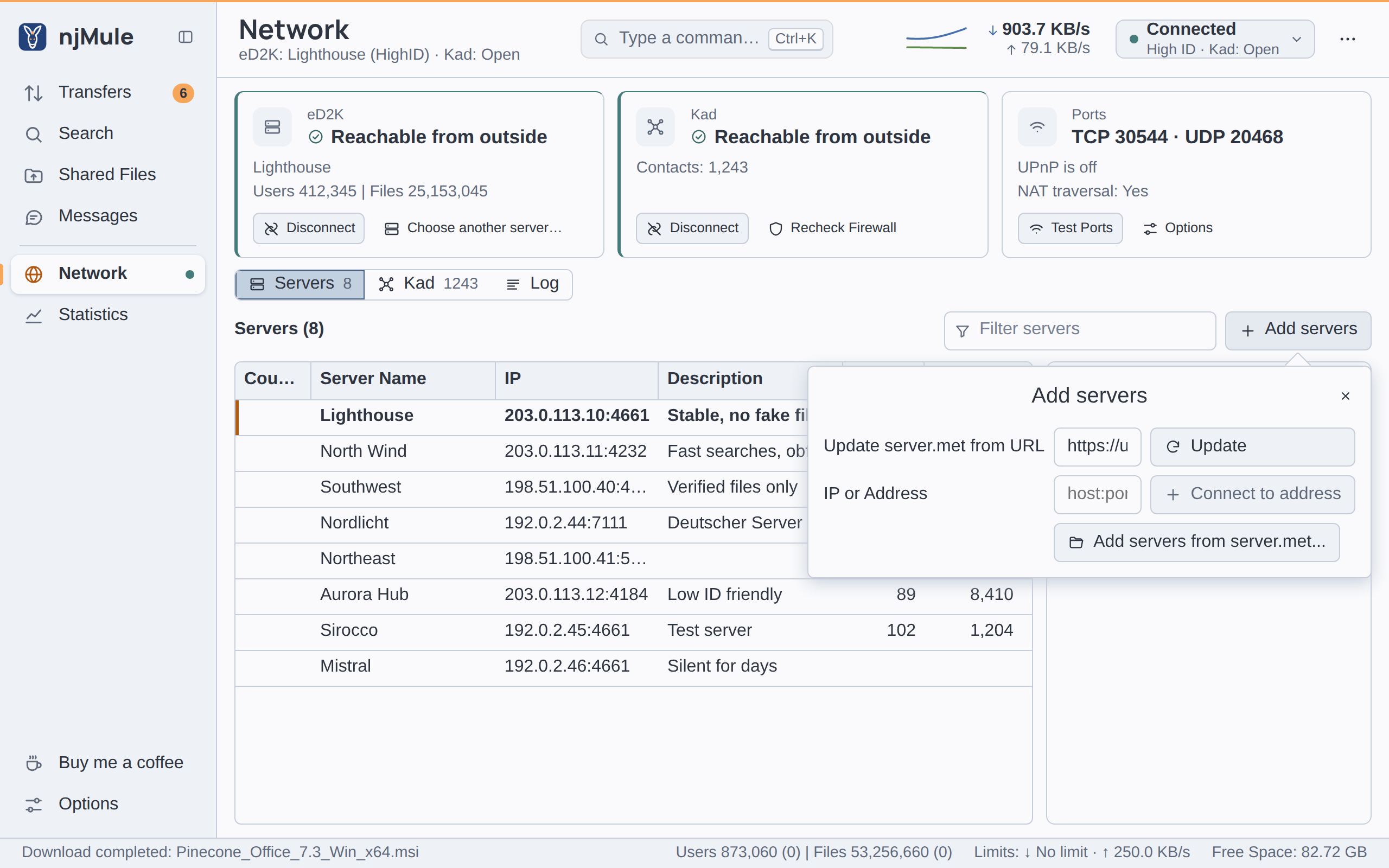
Open Network → Servers and click Add servers (while the list is empty, it also offers Update, which fetches the address in the first box at once):
- Update server.met from URL: type or choose the address of a
server.metand click Update. The box offers the addresses you used before; while you never used one it suggestshttps://upd.emule-security.org/server.met, but nothing is fetched until you click. Only the servers you do not have yet are added, and the log says12 new servers from …. - IP or Address: type
host:portand click Connect to address: the server is added and njMule connects to it. - Add servers from server.met…: choose a
server.metfile. The desktop app on the computer njMule runs on opens the system's dialog there; a browser sends a file of its own computer.
Server links work too: ed2k://|server|…|/ and ed2k://|serverlist|…|/ links clicked in a
browser, or pasted with Paste eD2K Links in the server menu, add their servers. Lists are
fetched over http or https from public addresses only, through the proxy and the
network interface of the options, with at most three redirects (never from
https to http), 50 MiB and 90 seconds; a gzip or zip file is unpacked.
A server known by its host name rather than an address (as some lists and static servers give them) keeps that name, and the name is looked up each time njMule connects to it.
From the command line, njmule --add-servers=<server.met> adds the servers of a file and
njmule --connect-server=<host:port> connects to one.
Static servers and priorities
Right-click a server to:
- Connect To it, or Disconnect from the one you are on;
- set its Priority to High, Normal or Low;
- Add To Static List or Remove From Static List;
- Copy eD2K Links, Remove it, or Remove All servers (njMule asks first: The list will be empty and njMule will use Kad only, until you add servers again from a server.met file or a link.).
Static servers are the ones you want to keep: they are never removed as dead, and they are kept
in staticservers.dat (eMule's format: host:port,priority,name per line). The server you are on
stands out in bold, with an accent bar and the tooltip Connected to this server; one being
tried is in italics, with the tooltip Connecting to this server.
The first column, Country, shows the flag and code of each server's country, its name in the tooltip, while Show the country of other clients is on (Options → General, on by default); the details of a server show them after its address.
Connecting
Connect (in the top bar's network menu or on the eD2K card) picks a server for you:
- High priority servers first, then normal, then low; among equals, those that failed least. With Autoconnect to servers in static list only (Options → Server), only static servers are tried.
- Two servers are tried at once, so a dead one does not hold you up; each gets 25 seconds to log you in, and each failed attempt shows in the log.
- With obfuscation requested (the default), servers that take obfuscated connections are tried that way first, then every server plainly if none did.
Once you are logged in, the server checks your TCP port and gives you a HighID or a LowID (see Ports). A connection with nothing to send for 15 minutes sends a small keep-alive, so routers that drop idle connections keep it.
Reconnect on loss (on by default) replaces a lost server at once, or after 30 seconds when it was lost again soon after a reconnect; when no server accepts you, every server is tried again after 30 seconds until you click Cancel or Disconnect. Autoconnect on startup (on by default) connects to a known server when njMule starts.
While you are connected, njMule also asks the other servers of the list over UDP for sources of the downloads that need more (up to 35 files per server, one request a second, then a pause of half an hour), and pings them for their names, users and files, so the list shows them without connecting.
Keep the list tidy
The Server page of the options (Options → Server) holds eMule's server options:
| Option | Default | What it does |
|---|---|---|
| Remove dead servers after … retries | 1 | A server that failed this many attempts in a row (1 to 10) leaves the list. Pings count until one is answered. Static servers and the server you are on always stay. |
| Update server list when connecting to a server | Off | Adds the servers that the server you log in to tells of. |
| Update server list when a client connects | Off | Adds the server each client that greets you is on. |
| Autoconnect to servers in static list only | Off | Connect tries only static servers. |
| Set manually added servers to high priority | Off | Servers you add by address get the high priority. |
| Auto-update server list at startup | Off | At each start, takes the servers of every server.met address in the list that List… edits. |
Servers learnt from a server or from clients get the low priority and are named after their
address until they tell their name. The addresses of List… are kept one per line in
addresses.dat, eMule's file, which the import takes over too.
Kad
Joining Kad
Kad needs at least one node to start from. njMule finds one in several ways, and you rarely have to help:
- The contacts you knew last time, saved in
nodes.dat(every 30 minutes and when Kad stops, as long as it heard from at least 25 of them, so a short outage never loses a good list). - The contacts shipped with njMule, also from upd.emule-security.org. They are asked for contacts one at a time, next to your saved ones, and never become your own contacts, since every new user starts from them. When they run out before Kad connects, they are asked again after five minutes.
- The clients you meet on eD2K: while Kad is not connected, a client running Kad 2 that you meet over eD2K is asked for contacts (one every ten seconds at most), so a working eD2K connection also brings Kad in.
If Kad still does not connect, open Network → Kad → Join Kad (open by itself while Kad is not connected):
- Nodes.dat from URL: type or choose the address of a
nodes.datand click Download. While you never used one, the box suggestshttps://upd.emule-security.org/nodes.dat, fetched only when you click. - Add contacts from nodes.dat…: choose a
nodes.datfile, as for aserver.met. - From a client you know: type its address and UDP port (
host:UDP port, such as a running eMule's192.168.1.30:4672) and click Bootstrap. On the command line:njmule --kad-bootstrap=<host:port>.
Contacts of an ordinary nodes.dat are added and looked up at once. A nodes.dat made only to
start from (a bootstrap list, as some web sites offer) is handled like the shipped contacts: the
50 closest to your Kad ID are kept, and asked one at a time (every 2 seconds while no contact is
known, every 15 otherwise) only until Kad connects.
Contacts
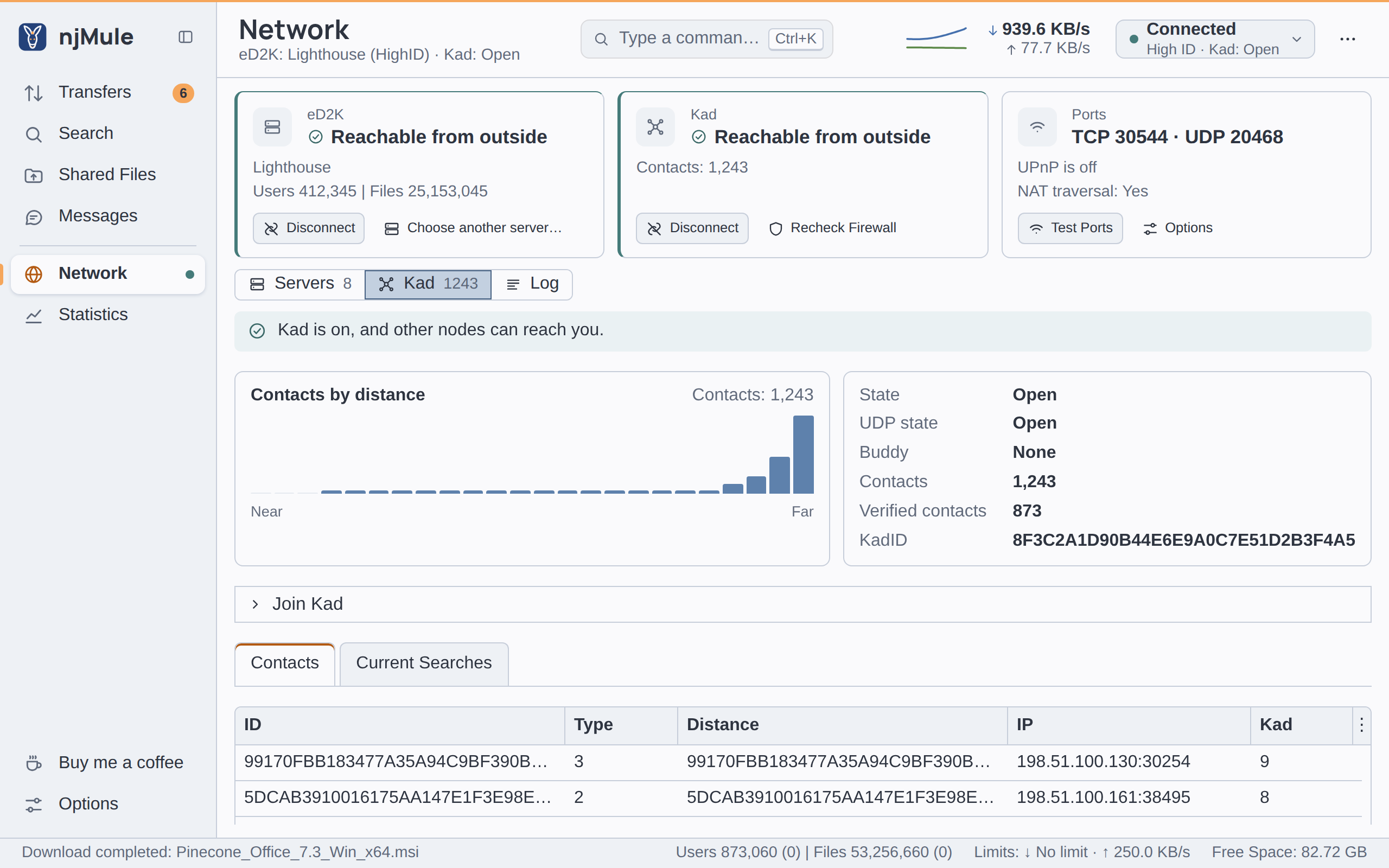
The Kad view shows your node's facts (State, UDP state, Buddy, Contacts, Verified contacts, KadID), the contacts drawn by distance from the closest to the farthest, the Contacts of the routing table (ID, type, distance, address with the flag and code of its country, Kad version) and the Current Searches. Kad counts as connected while packets keep coming in. It also estimates the size of the network: the status strip shows the users and files of the servers and, in brackets, those Kad estimates.
Connect and Disconnect on the Kad card (or in the top bar's network menu) start and stop Kad by hand; stopped by hand, it stays off until you connect it again or restart njMule.
Firewall check
Kad finds out whether others reach you: other nodes are asked to connect to your TCP port, and nodes you never wrote to are asked to send a datagram to your UDP port (to the port your router shows too). The checks run when Kad starts, every hour, and when you click Recheck Firewall. The outcome shows on the Kad card, in the Kad view, in the top bar and in My Info: Open, or Firewalled with UDP open or UDP firewalled. See Ports for how to open them.
njMule also helps other clients with their own checks, once in a while per address.
Buddies
A client firewalled on both ports cannot be reached on Kad by itself. njMule then asks the nodes near the opposite of its Kad ID for a buddy: an open node that keeps a link to it and relays the callback requests of other clients, so that they can still download from you. It looks for one a few minutes after the firewall check, keeps a single buddy with pings, names it in the hello it sends to other clients, and lets it go once you are reachable again. The Buddy line of the Kad view and of My Info tells the state.
Open on both ports, njMule serves as the buddy of one firewalled node (Buddy of a firewalled client). With obfuscation required njMule takes no buddy, since callback requests cannot be obfuscated.
Publishing
While others can reach you (directly, through your buddy, or by a direct UDP callback), njMule publishes your shared files on Kad: their keywords, you as a source, and your comment and rating. Nothing is published while nobody could reach you. As a node, it keeps what others publish to it, saved in the Kad index files of the profile.
Searching
The search screen offers four methods:
| Method | Where it searches |
|---|---|
| Automatic | Kad when only Kad is connected, the server when only the server is. With both, Kad, unless the server is a static one or a big one in a short server list. |
| Server | The server you are on. |
| Global (Servers) | The server you are on, then the other servers of the list over UDP, until more than 100 results are in. |
| Kad | The Kad network. |
A search keeps up to 2,000 results, merged by file, so the same file found on several servers
shows once. Kad looks up one word, the longest of what you type, and keeps only the results that
match the whole expression; a search made only of OR alternatives is refused, since Kad needs
one word that every result contains. See Searching for the expression
syntax and the filters.