Using a proxy
A proxy is a server that opens connections on your behalf. You need one only when your network
allows no direct connections (some company or school networks), or when you want servers and
clients to see the proxy's address instead of yours. njMule can send its outgoing connections
through a SOCKS 4 or 5 proxy, with a user name and password if it asks for them, or through an
HTTP proxy that allows CONNECT. With SOCKS 5 its UDP traffic goes through the proxy too.
Set up a proxy
- Open Options → Proxy, in the desktop app or in the web interface.
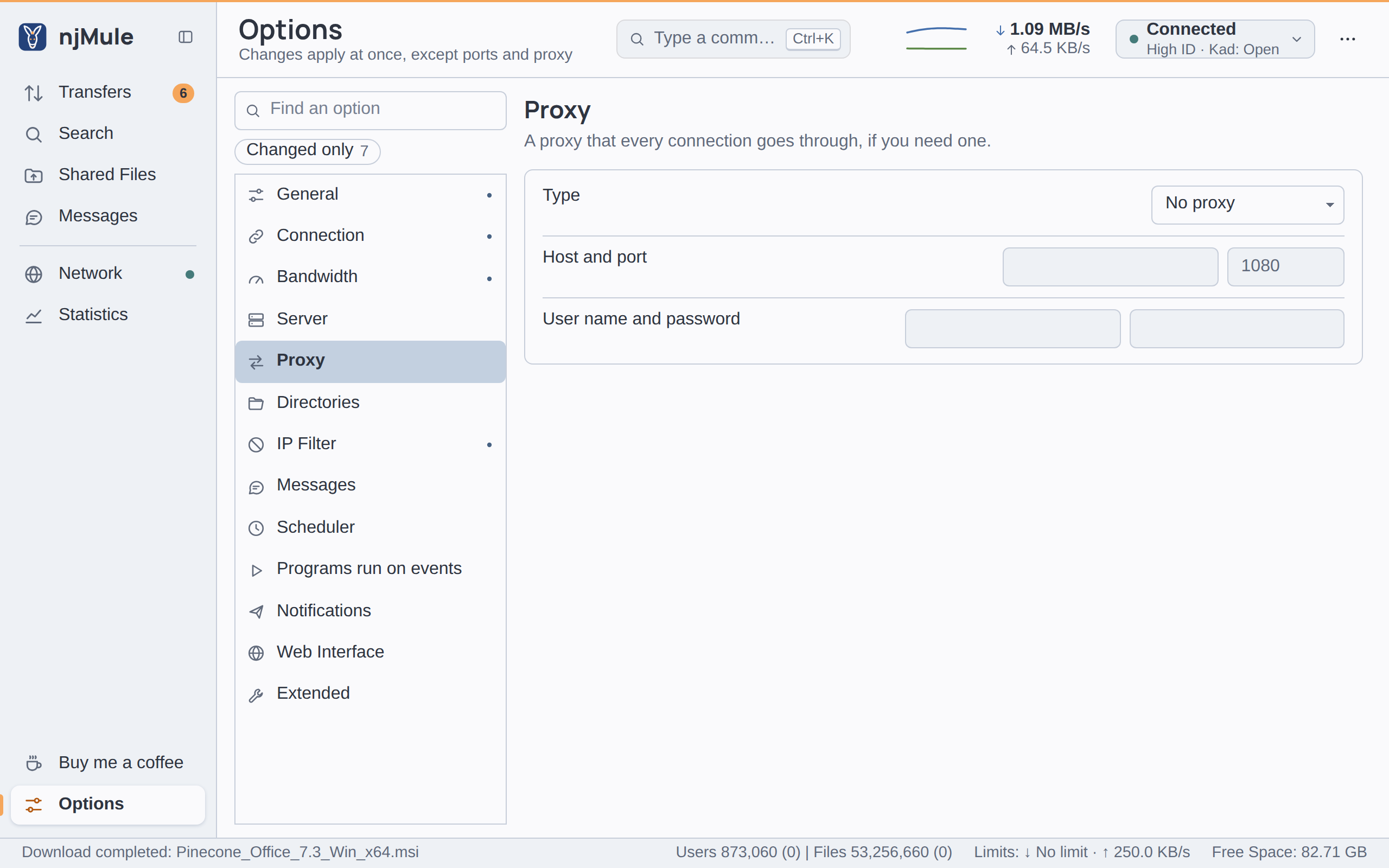
- Choose the Type: SOCKS 4 or 5 or HTTP (CONNECT).
- Fill in Host and port: the proxy's name or address and its port (1080 is filled in, the usual SOCKS port).
- If a SOCKS proxy asks for a login, fill in User name and password.
- Click Apply and reconnect in the bar under the page. The proxy takes effect for the connections opened from then on, and njMule asks the SOCKS 5 proxy for its UDP relay at once.
The settings are kept in njmule.properties as proxy.type (NONE, SOCKS or HTTP),
proxy.host, proxy.port, proxy.user and proxy.password. The password is stored as typed,
so keep your profile to yourself; the remote-control API never
gives it out. An imported eMule profile brings its proxy along.
Proxy types
| Type | How njMule uses it |
|---|---|
| SOCKS 4 or 5 | njMule speaks SOCKS 5 first, with the user name and password when given, and falls back to SOCKS 4 when the proxy answers in another version. Only SOCKS 5 can carry UDP and the lists fetched from the web. |
| HTTP (CONNECT) | Each TCP connection is opened with CONNECT. No login is sent: the user name and password go to SOCKS proxies only. HTTP proxies carry no UDP. |
Many HTTP proxies allow CONNECT only to port 443, while eD2K servers and clients listen on many
other ports. Prefer a SOCKS 5 proxy if you can.
What goes through the proxy
- Every outgoing TCP connection: to eD2K servers and to other clients (downloads, uploads, callbacks, chats, browsing shared files).
- Lists fetched from the web:
server.met,nodes.datand IP filter lists, through an HTTP or SOCKS 5 proxy. - The update check and update downloads, and the monthly download of the country database when you show countries.
- Notifications: e-mails through an HTTP or SOCKS proxy (a SOCKS one gets the user name and password), web hook requests through an HTTP or SOCKS 5 proxy.
- UDP, with a SOCKS 5 proxy: Kad, the UDP between clients and the datagrams to servers (pings,
global searches, source requests) go through the proxy's UDP relay (
UDP ASSOCIATE).
UDP through SOCKS 5
njMule asks the SOCKS 5 proxy for a UDP relay for each of its two UDP sockets, "Kad UDP" and "Server UDP". While a relay is being set up, or after the proxy ended one, those sockets are held: nothing is sent and nothing answered, so no datagram leaves around the proxy. njMule asks again after 30 seconds, then waits twice as long each time, up to five minutes. Datagrams that reach the socket from anywhere but the relay are dropped. The log tells each step:
Kad UDP goes through the UDP relay of the SOCKS5 proxy, /203.0.113.5:40123
Kad UDP is held until the SOCKS5 proxy answers: …
Server UDP is held: the SOCKS5 proxy ended its UDP relay, asking it again
If the proxy cannot relay UDP (an HTTP proxy, a SOCKS 4 one, or a SOCKS 5 one that refuses the command or the login), UDP goes straight to the network, and the log warns:
Kad UDP goes straight to the network: an HTTP proxy carries TCP only
What does not go through it
- Incoming connections. Other clients connect to your own ports, never through the proxy. Servers see the proxy's address and check that one for a HighID, so you will usually get a LowID (see Ports).
- Name lookups. The names of servers and of web lists are looked up by your computer, then the proxy is asked to connect.
- Port forwarding. UPnP, NAT-PMP and PCP talk to your own router on the local network.
- NAT traversal is off with a proxy, since other clients would see the proxy's address (see NAT traversal).
- UDP over IPv6 is not used, as a relay carries IPv4 only.
While a proxy is set, njMule does not tell your public IPv6 address to other clients, in its hello, Kad publishes or source exchange, so that they cannot reach you there around the proxy; it stops telling it as soon as you apply the proxy.
Check that it works
- Look at Network → Log after Apply and reconnect: the lines above tell where UDP goes.
- Connect to a server: My Info shows the address the server sees, which should be the proxy's.
- If nothing connects, check the host, the port and the login, and whether the proxy allows connections to the ports of eD2K servers and clients.