IP filter
The IP filter is a list of address ranges that njMule never talks to: it refuses their connections, does not connect to them, and leaves them out as servers, Kad contacts and sources. People use it to keep away from addresses known for fake files, spying or abuse. njMule reads the lists eMule and other clients use, can fetch them from the web and keeps them up to date.
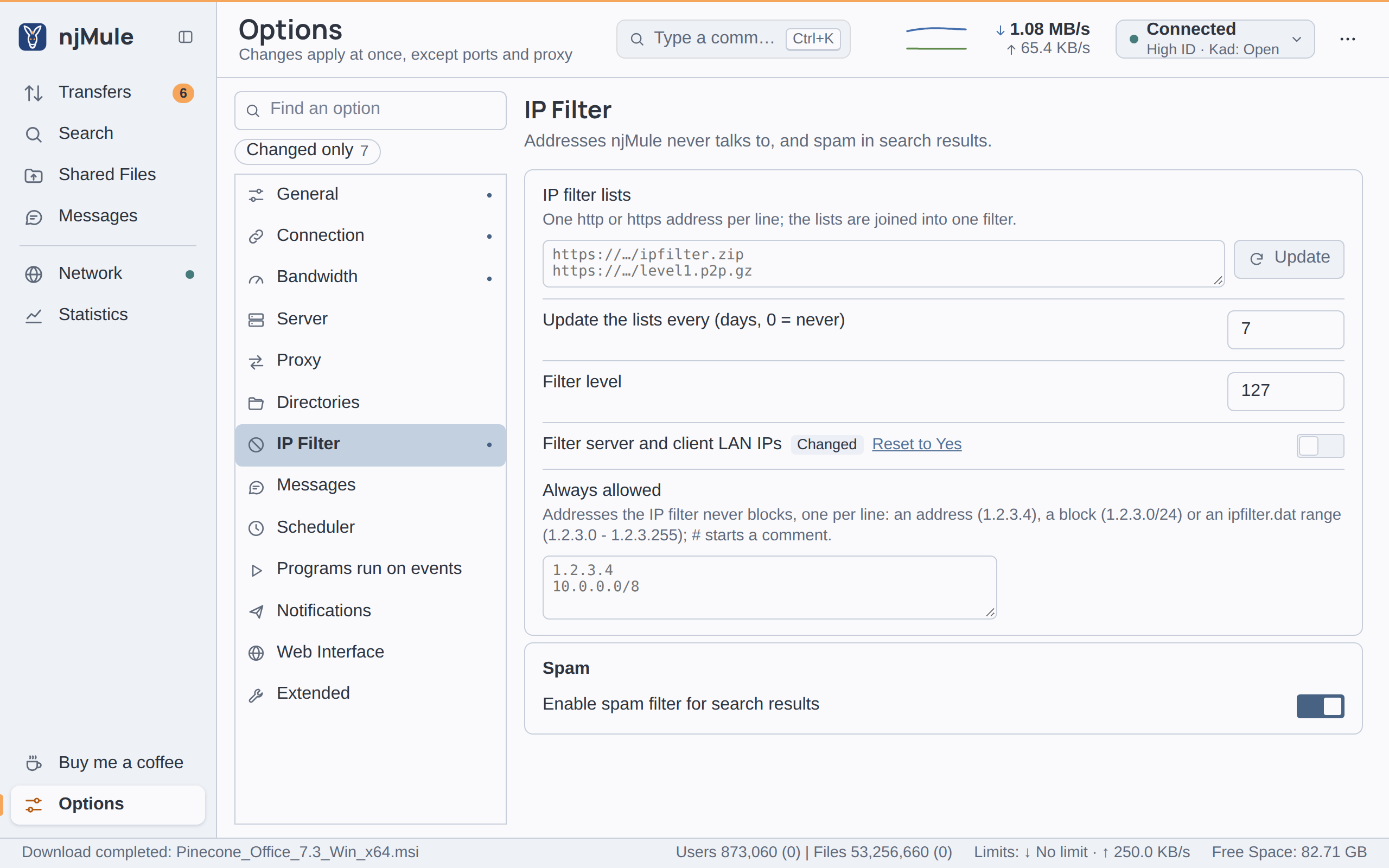
The IP filter is empty until you give it a list. Its options are on Options → IP Filter, in the desktop app and in the web interface.
How it works
Each range of a list has a level from 0 to 255. A range blocks when its level is below the
Filter level of the options (127 by default), so with the default the ranges of levels 0 to
126 block. ipfilter.dat lines carry their own level; ranges from PeerGuardian and P2B lists have
the level 100, so they block at the default. Where ranges of different levels overlap, each keeps
its own: a blocked range inside an allowed one stays blocked.
The filter applies everywhere:
- connections from other clients are refused before anything else is read;
- servers in the blocked ranges are neither added nor connected to, even by hand;
- Kad contacts and sources are left out, whether they come from a server, from Kad, from other clients, from a link or are added by hand.
A change (new lists, another level, the LAN switch, the always allowed list) applies at once: the server, the sources, the clients and the Kad contacts it now blocks are dropped.
The filter knows IPv4 ranges only; clients that come over IPv6 are not filtered by it.
Lists from the web
- In IP filter lists, type the address of each list, one per line, up to 16 (
httporhttpsonly). - Click Update to fetch them now: njMule says Downloading IP filter file, then 123456 IP filters loaded.
- Set Update the lists every to the number of days after which they are fetched again (7 by default; 0 fetches them only when you click Update).
All the lists are joined into one filter, written to ipfilter.dat in the configuration folder.
A list that cannot be fetched or read is left out and named in the log
(IP filter list example.org left out: …); if none can, the filter stays as it was, and the
automatic update logs IP filter lists not updated: …. The update is due once ipfilter.dat is as
many days old as the option says; njMule looks every hour, the first time a minute after it starts,
and waits six hours before trying again after a failure.
The lists are fetched through the proxy and the network interface of the options, from public addresses only, with at most three redirects (never from https to http), 50 MiB and 90 seconds per list. A list that a server cut short is refused rather than read in part.
The same update runs from the remote-control API
(POST /ipfilter/lists for the lists of the options, POST /ipfilter for one address).
Supported formats
| Format | Lines look like | Recognised |
|---|---|---|
eMule's ipfilter.dat | 1.2.3.0 - 1.2.3.255 , 100 , Some name | by its lines |
PeerGuardian text (.p2p, such as level1.p2p) | Some name:1.2.3.0-1.2.3.255 | by a .p2p name or by its lines |
| PeerGuardian binary (P2B, versions 1 and 2) | binary | by its header |
A list may be gzip or zip compressed (ipfilter.zip, level1.p2p.gz): it is unpacked
first, within the same 50 MiB. From a zip, njMule takes the file named ipfilter.dat,
guarding.p2p or guardian.p2p, or else the file it holds.
The ipfilter.dat file
ipfilter.dat, in the configuration folder, is the filter njMule loads at
each start, in eMule's format. The import from eMule copies
eMule's own. You may also put a file there yourself while njMule is stopped, in any of the formats
above. An update from the lists replaces it.
Filter level
Filter level (security.ipFilterLevel, 0 to 255, default 127) decides which ranges block: those
whose level is below it. Raise it to block more of an ipfilter.dat that grades its ranges; 0 blocks
nothing. The level is applied as the file is read, so changing it needs no new download.
LAN addresses
Filter server and client LAN IPs (on by default, security.filterLan) leaves out servers,
sources and Kad contacts at private, local addresses (192.168.x.x, 10.x.x.x and the like),
which nobody on the Internet can use. Turn it off to trade with another client on your own network,
for example a second computer. A source you add by hand, and the sources a link names, are taken
even at a LAN address; the IP filter still applies to them.
Always allowed
Always allowed (security.ipFilterWhitelist) lists addresses that the IP filter never blocks,
whatever the lists say, one per line:
# a friend's address
203.0.113.25
# a block
198.51.100.0/24
# a range as ipfilter.dat writes it
192.0.2.0 - 192.0.2.255
Lines starting with # or // are comments. A line that is none of these forms is named under
the box and not saved. The list applies at once, and the log says how many entries it holds.
Check that it works
- The log tells the number of ranges after each change, for example
123456 IP filter rangesor123456 IP filter ranges at level 127. - A blocked server cannot be connected to; a blocked source never shows among the sources.
Spam in search results
The Spam section of the same page, Enable spam filter for search results, is not part of the IP filter: it rates search results by what you marked as spam. See Searching.