Import an eMule profile
If you used eMule, njMule can take your profile over: the servers, Kad contacts, known and shared files, preferences, friends, searches and categories, and, if you ask, your identity with its credits and copies of your unfinished downloads. njMule only reads eMule's folder: nothing there is ever changed, moved or deleted.
You can import from the first-start wizard, the desktop app or the web interface or the command line. Each of them can check the profile first and show what would happen, before anything is taken.
Before you start
- Close eMule. njMule refuses to take eMule's identity while eMule runs, and copies only the downloads that are paused in it.
- Find eMule's configuration folder, the one that holds
preferences.ini. njMule looks for it in%LOCALAPPDATA%\eMule\configand%APPDATA%\eMule\config; if your eMule keeps its files elsewhere, for example in its program folder, choose thatconfigfolder yourself. - Keep njMule's configuration out of eMule's folder. If njMule's own configuration is inside the eMule folder you choose, it takes nothing.
- Make room for the downloads, if you copy them: the copies take as much space as eMule's part files, in njMule's temporary folder.
From the first-start wizard
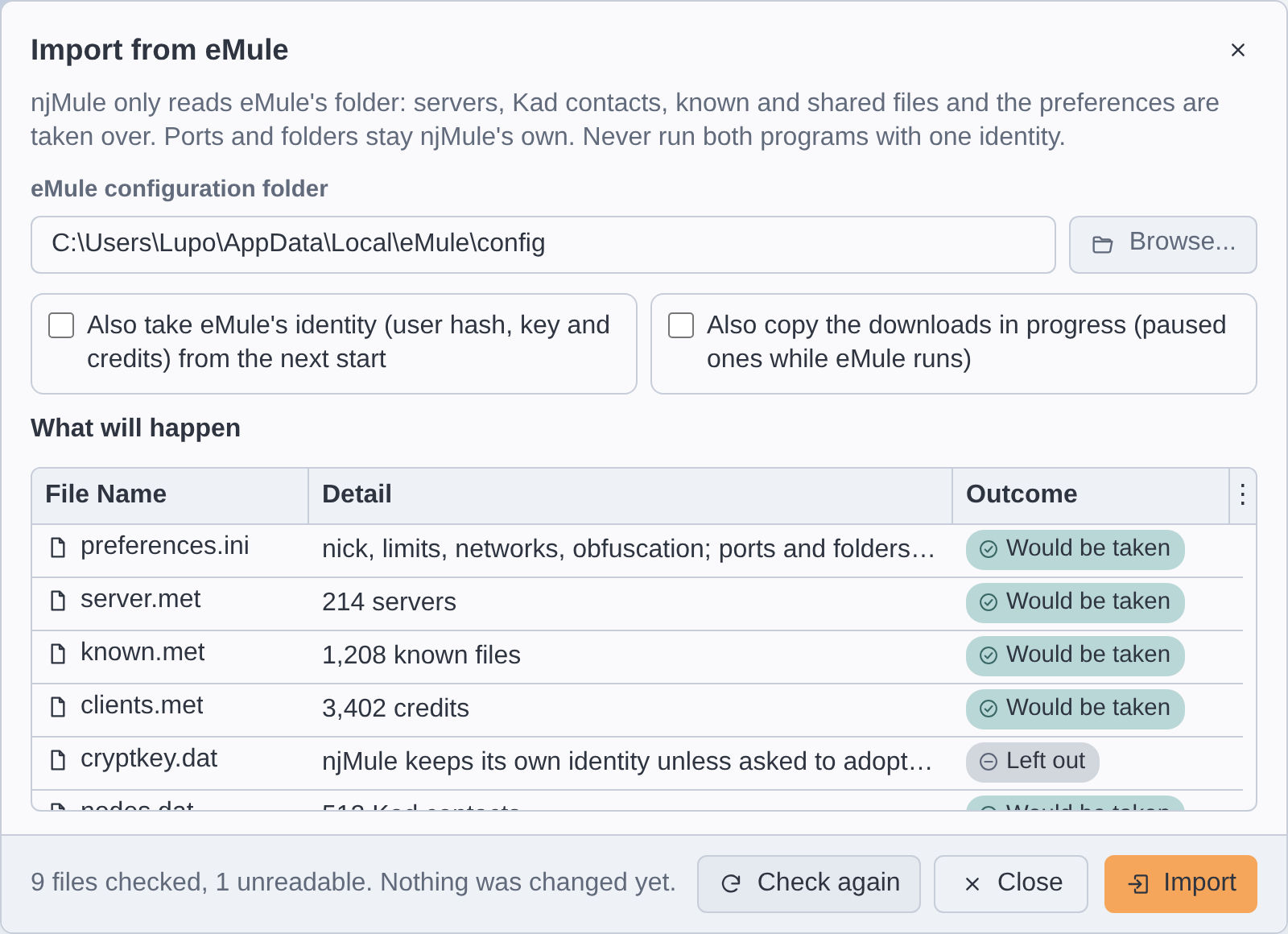
When njMule finds an eMule profile at its first start, the wizard's last page offers Open the import from eMule when I finish. Leave it ticked and choose Finish: the Import from eMule window opens. Go on as below. See First start.
From the desktop app or the web interface
- Choose ⋯ → Import from eMule... in the top bar (or press Ctrl+K and
type
Import). - Check the eMule configuration folder, filled in when njMule found one, or choose it with Browse.... In a browser, or in a window on another computer's njMule, Browse... is disabled: type the path of the folder as it is on the computer where njMule runs, which may not be the one you browse from.
- If you want them, tick one or both of:
- Also take eMule's identity (user hash, key and credits) from the next start (see Your identity);
- Also copy the downloads in progress (paused ones while eMule runs) (see Your downloads).
- Choose Check. njMule reads every file and lists, under What will happen, each file with its detail and its outcome; the line below says how many files were checked and that nothing was changed yet.
- Read the list, then choose Import. If you change a box, choose Check again first.
The list then shows what was taken. If eMule started when you logged in, the detail of
preferences.ini says start at login, and the desktop app on njMule's computer now starts when
you log in too and tells you so (or why your system refused); turn that off in eMule so that only
one of them starts. In a browser, or in a window on another computer's njMule, turn on Start
njMule when I log in yourself in Options → General of the desktop app on njMule's computer.
The searches and the server list addresses typed in eMule's boxes are offered again in njMule's, as long as these have none of their own: see What is imported.
From the command line
Stop njMule first (njmule --exit): only one njMule runs on a configuration at a time. Then:
njmule --import-emule "C:\Users\you\AppData\Local\eMule\config" --dry-run
--dry-run only reports what would happen. Without it, njMule imports, prints the outcome of each
file and exits. Two options add the parts that are not imported by default:
| Option | What it adds |
|---|---|
--adopt-emule-identity | eMule's user hash, key, credits and Kad identity, from the next start |
--import-downloads | copies of eMule's unfinished downloads (only the paused ones while eMule runs) |
Each line of the report gives the outcome, the file and the detail, for example:
What would be imported from C:\Users\you\AppData\Local\eMule\config
  would import  preferences.ini      nick, limits, networks, obfuscation; ports and folders stay njMule's
  would import  server.met           212 servers
  skipped       preferences.dat      njMule keeps its own identity unless asked to adopt eMule's
To import into another profile of njMule, add --config-dir <dir>. See
Command line.
What is imported
| eMule file | What njMule takes | Applies |
|---|---|---|
preferences.ini | the preferences listed below; never the ports nor the folders | at once |
server.met | the servers, added to njMule's list | at once |
nodes.dat | the Kad contacts (or bootstrap nodes) | at once |
known.met, known2_64.met | the hashes and AICH trees of the files eMule knew, so that shared files are not hashed again | at once |
shareddir.dat and eMule's incoming folder | the shared folders, each without its subfolders, as eMule shares them | at once |
Category.ini | the categories, with their numbers, names, folders, comments, colours and file name patterns, when njMule has none of its own | at once |
addresses.dat | the server list addresses used to update the server list at start | at once |
AC_ServerMetURLs.dat, AC_SearchStrings.dat | the server list addresses and the searches typed in eMule's boxes, offered under njMule's server list address box and search box while those have no history of their own | at once |
ipfilter.dat | the IP filter, when njMule has none of its own | next start |
emfriends.met | your friends | next start |
cancelled.met | the files you cancelled, shown as such in search results | next start |
StoredSearches.met | the searches left open, which come back as tabs | next start |
SearchSpam.met | the search results marked as spam, and what the spam filter learnt | next start |
fileinfo.ini | your file comments and ratings | next start |
staticservers.dat | the static servers | next start |
A file of which njMule already has its own copy is left out ("we have our own"), so a second import
does not overwrite what you changed since. That is why the best time to import is right after
installing njMule, before it keeps lists of its own. eMule's statistics (statistics.ini), the
history of its IP filter and bootstrap boxes (AC_IPFilterUpdateURLs.dat, AC_BootstrapIPs.dat)
are not taken: njMule counts its own statistics.
These are never taken:
sharedfiles.dat, the single files eMule shares outside its shared folders: the report counts them as "not shared yet". Share their folders, or the files' folders, in Shared files.key_index.dat,src_index.datandload_index.dat: what other Kad nodes published to eMule, which is short-lived.- The identity and the downloads, unless you ask for them (see below).
Files larger than 256 MiB are refused as not being eMule's.
Preferences
From preferences.ini, njMule takes the values it has an option for:
- your nick, the upload and download limits and the capacity of your line;
- the minimum free disk space, when eMule's check of it is on;
- the maximum of connections, of new connections in five seconds, of sources per file and the size of the upload queue;
- eD2K and Kad on or off, obfuscation, secure identification, the credit system, the proxy and the address eMule was bound to;
- the server options: connect at start, reconnect, dead server retries, adding servers from servers and clients, static servers only, high priority for servers added by hand, updating the server list at start;
- remembering downloaded and cancelled files, keeping searches, the search spam filter, adding downloads paused and starting the next one;
- the LAN address filter and the IP filter level;
- the message filters: friends only, filtered words, the anti-spam filter, and the comment filter;
- tidying file names: the words removed and whether new downloads are tidied;
- preview first and last parts, the video player and its arguments, the notification sound;
- who may see your shared files.
The ports and the folders stay njMule's own.
Check and its report
Check (or --dry-run) reads every file of the profile and changes nothing. Each file gets an
outcome:
| Outcome | Command line | Meaning |
|---|---|---|
| Would be taken | would import | the check read it; Import will take it |
| Taken | imported | the import took it |
| Left out | skipped | not taken, for the reason in the detail: njMule has its own, you did not ask for it, eMule runs… |
| Not there | missing | the profile has no such file |
| Unreadable | failed | the file is damaged or refused; the detail says why |
The detail counts what is in each file (servers, contacts, known files, friends…) and, after an import, how many were new.
Your identity
Your identity on the network is your user hash, with the key that proves it (secure identification). Other clients keep your credits under it: what you uploaded to them, which moves you up in their upload queues. Taking eMule's identity keeps those credits.
With Also take eMule's identity (or --adopt-emule-identity), njMule takes:
- the user hash (
preferences.dat) and the key (cryptkey.dat), only together: one without the other would fail every identification; - the credits of the clients you met (
clients.met); - the Kad identity (
preferencesKad.datand the Kad UDP key ofpreferences.ini).
The identity is set aside and applied at the next start of njMule, replacing njMule's own. It is never taken while eMule runs: the import refuses it then, and a start of njMule while eMule runs keeps it aside for a later start. The configuration backups keep the identity njMule had before (see Backups).
Two clients online at the same time with the same user hash spoil each other's credits. Once njMule uses eMule's identity, do not run eMule and njMule at the same time.
Without the box, njMule keeps its own identity and the report says so.
Your downloads
With Also copy the downloads in progress (or --import-downloads), njMule copies each of
eMule's unfinished downloads, the .part.met and the .part file, from eMule's temporary folders
into its own, and goes on downloading them. The complete parts are checked again. Downloads keep
their category when it came with the same import.
- They are copies: eMule's files stay as they are, and eMule still lists them.
- While eMule runs, only the downloads paused in it are copied; the others are left out with "pause it in eMule first". Close eMule, or pause them, and import again.
- A download whose data file is missing is reported as unreadable.
The import manifest
Each import (not a check) writes a manifest in the import folder of njMule's configuration, named
after its date and time, such as config/import/20261026-101500.txt. It lists every file read from
eMule, with its size, its SHA-256 and what became of it, so that you can check later what was
imported from where:
# njMule import from C:\Users\you\AppData\Local\eMule\config at 2026-10-26T09:15:00Z
# outcome	bytes	SHA-256	file	detail
IMPORTED	…	…	server.met	212 servers; 180 new
See Data locations for where the configuration is.
Keeping eMule
eMule's folder is only read, so you can go on using eMule after the import. If you do:
- never run both at the same time with one identity (see above);
- give them different ports if they may run at the same time;
- remember that imported downloads exist twice, once in each program.
On macOS and Linux
njMule looks for an eMule profile by itself only on Windows. On macOS and Linux you can still import
a profile copied from a Windows computer, or one of an eMule running under Wine: choose its
config folder. Folders that the profile names as Windows paths, or that do not exist on this
computer, are left out: the shared folders and eMule's temporary folders among them (njMule then
looks for downloads in the Temp folder beside config). njMule may not notice an eMule running
under Wine, so close it yourself before importing.