eD2K links
An eD2K link names a file of the eD2K network, or a server, a list of servers or a list of Kad
nodes, in one line of text that starts with ed2k://. Web pages and other people share files this
way: a file link holds the file's name, size and hash, which is all njMule needs to download it from
whoever has it. This page lists the kinds of links, the ways to add them, and how to let njMule open
the links you click in a browser.
Kinds of links
| Link | Looks like | What njMule does with it |
|---|---|---|
| File | ed2k://|file|name|size|hash|/ | Adds a download of the file. |
| Server | ed2k://|server|host|port|/ | Adds the server to your server list. |
| Server list | ed2k://|serverlist|https://…/server.met|/ | Downloads the server.met and adds its servers. |
| Nodes list | ed2k://|nodeslist|https://…/nodes.dat|/ | Downloads the nodes.dat and adds its Kad contacts. |
| Search | ed2k://|search|words|/ | Understood, but not acted upon yet. |
| Magnet | magnet:?xt=urn:ed2k:hash&xl=size&dn=name | The eD2K form of a magnet link: adds a download, as a file link does. |
A file link may carry more after its hash, which njMule uses when it is there:
h=the file's AICH hash, which lets njMule check and repair its parts;p=the hashes of its parts;s=a web address the file can also be downloaded from (http or https only);- after the closing
/, a list of sources:|sources,198.51.100.7:4662,…|/, at most 32,767 of them; a list dated with@and a date (|sources@261231,…|/) is left out from that date on.
A file may be up to 256 GiB. Links whose separators a browser escaped (%7C for |) are read too.
A magnet link is taken only in its eD2K form (urn:ed2k: or urn:ed2khash:, with a name and a
size); the magnet links of BitTorrent stay with the programs made for them.
Adding file links
There are several ways to add eD2K file links as downloads:
| Way | How |
|---|---|
| Add links | In Transfers, press Add links and paste the links: see below. |
| Pasting in Transfers | Press Ctrl+V on the Transfers screen, outside its fields: the links go into the category shown. |
| The command palette | Press Ctrl+K, paste the links and choose Download: …. |
| Drag and drop | Drag links from a web page or a text onto the njMule window. |
| A browser | Click a link, once njMule opens ed2k links: see Opening links from a browser. |
| The command line | njmule-gui "ed2k://|file|…|/": see The command line. |
| The clipboard | Copy links anywhere, while the desktop app watches the clipboard: see Watching the clipboard. |
Pasting in Transfers, the palette and drag and drop find every file link in the text, apart by
spaces or lines: ed2k://|file| links, escaped or not, and the magnet links of eD2K files. Each
becomes a download; the clipboard is watched for a text that starts with such a link. Each
download goes into the first category whose names it matches (see Categories),
and starts paused when Add files to download in paused mode is on in
Directories.
A message names each one added (Download added: …). Adding the link of a file you already
download only adds its sources to the download.
The Add downloads dialog
Add links opens Add downloads, a dialog that shows the files before they are added. Links on the clipboard are already in it.
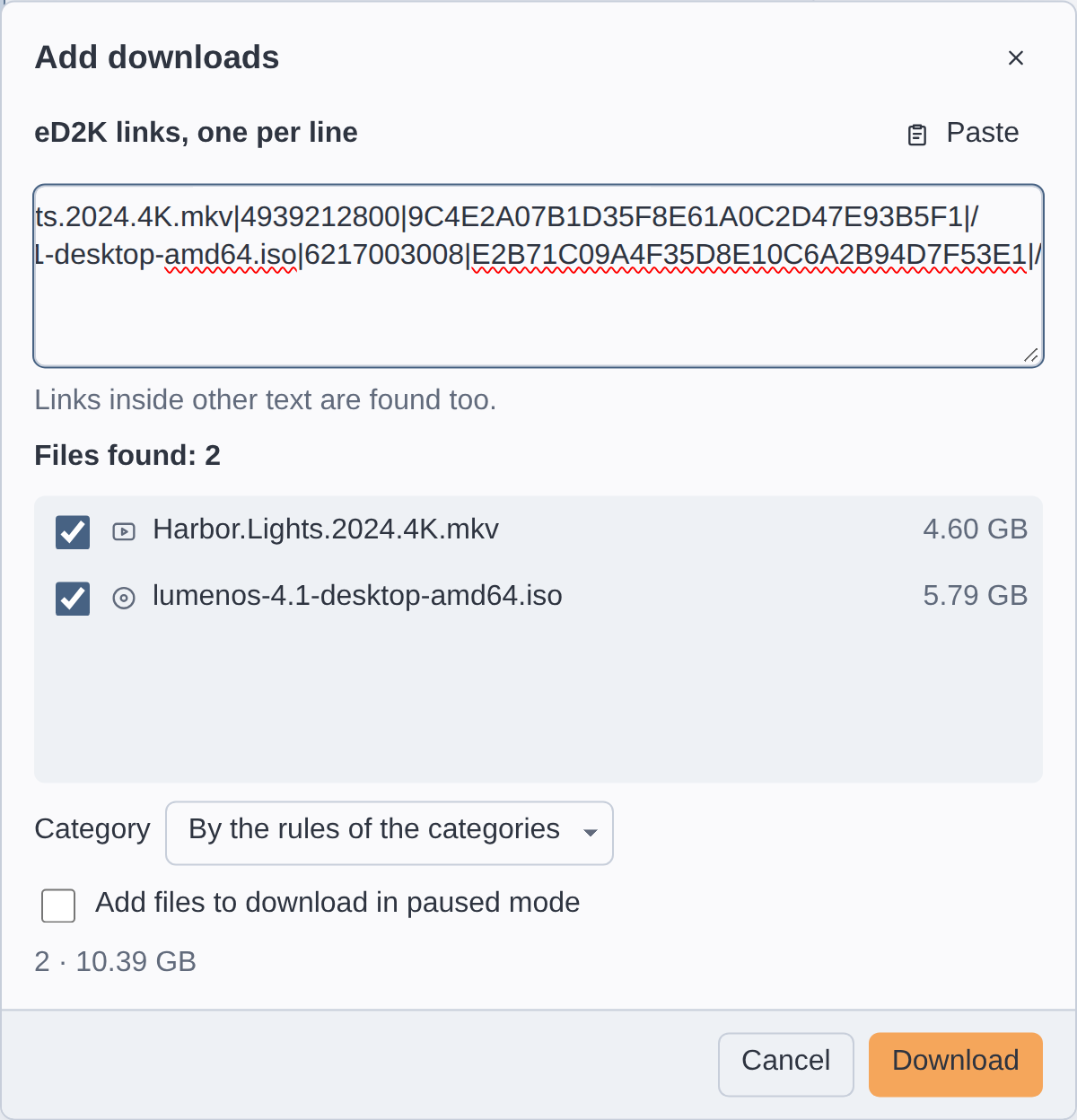
- Type or paste the links in eD2K links, one per line; Paste adds what is on the clipboard after what is there. Links inside other text, such as a page's text or its HTML, are found too.
- Under Files found: … every file appears once, with its size and what njMule knows of it already: Already downloading or Shared. Untick the files you do not want: those you download or share already start unticked.
- Choose the Category: By the rules of the categories (the default unless Transfers shows one category), (Unassign), or one of your categories.
- Tick Add files to download in paused mode to add them paused. It starts ticked when the option of Directories is on, and what you choose here wins over it.
- The line at the bottom counts the files and their total size. Press Download.
Download stays off while no file is ticked. The box takes file links only, escaped and magnet ones too, wherever they are in the text.
Opening links from a browser
When njMule opens ed2k links, a click on a link in a browser (or another program) hands it to njMule: a file link becomes a download, a server link adds the server, and server and nodes lists are downloaded. If njMule is not running, it starts with the link. On Windows and Linux njMule takes the links only when you ask it to (off by default), and gives them back when you ask again.
- Windows
- macOS
- Linux
- Open Options → General.
- Under Miscellaneous, turn on Open ed2k links with njMule (from browsers and other programs).
njMule then registers its desktop program, njmule-gui.exe, as the handler of ed2k links for your
user only. What opened them before, such as eMule, is saved first (in ed2k-handler-backup.reg, in
njMule's configuration folder), and turning the option off gives the links back to it.
Uninstalling njMule gives the links back by itself (an upgrade keeps them).
The njMule app declares the ed2k scheme to macOS, which sends it the links you open, also those
that start it. There is no option to turn on: if another application also declares ed2k links,
macOS chooses which one opens them.
- Open Options → General.
- Under Miscellaneous, turn on Open ed2k links with njMule (from browsers and other programs).
njMule then makes its desktop entry, org.njmule.njMule.desktop, the default handler of
x-scheme-handler/ed2k for your user (as xdg-mime does). The handler it replaces is saved first
(in ed2k-handler-previous, in njMule's configuration folder), and turning the option off restores
it, or takes njMule out of your mimeapps.list when there was none.
Before you remove the deb or rpm package, turn the option off or run njmule --restore-links.
The option works only in the installed desktop app on njMule's computer, on Windows and Linux: it is greyed out on macOS, in a development build, in the web interface and in a window on a remote njMule. If changing the handler fails, njMule says Cannot change which program opens ed2k links: … and the switch shows the real state again.
Giving the links back
njmule --restore-links gives the ed2k links back to what opened them before njMule took them,
if njMule still has them, then exits. It tells what it did: ed2k links given back., ed2k links
open in another program: left as they are., or that this program does not open ed2k links here.
The Windows uninstaller runs it for you.
njmule --restore-links
The command line
Links given to the desktop app on the command line are handled as a click in a browser, and so are
the magnet links of eD2K files, as the njmule command line takes them. Quote each link, as the |
and & in it mean something to the shells:
njmule-gui "ed2k://|file|Example.iso|734003200|0123456789ABCDEF0123456789ABCDEF|/"
njmule-gui "magnet:?xt=urn:ed2k:0123456789ABCDEF0123456789ABCDEF&xl=734003200&dn=Example.iso"
If the desktop app already runs, the links go to it, its window comes to the front, and the new
start ends at once. Started without links, a second start only brings the running window to the
front. When njMule runs without a window on the same profile, such as njmule in a terminal, the
links go to it and the desktop app says so instead of opening. Words that are not eD2K or magnet
links are left out, and a magnet link of another network adds nothing. For the other options of the command line, see Command line.
Watching the clipboard
The desktop app can notice eD2K file links you copy in other programs. Turn on Watch clipboard for eD2K file links in General options (off by default; greyed out in the web interface). Then:
- Copy a text that starts with an eD2K file link, escaped or not, or with the magnet link of an eD2K file, in a browser or elsewhere.
- njMule asks Add these eD2K file links to download?, naming the files (up to ten).
- Press Download to add them, or Leave them.
While the option is off, njMule never reads the clipboard. Only what you copy after turning it on counts, and the links njMule copies itself are left alone.
Copying links
Every list of files copies their links, one per line, to give to others:
- Copy eD2K link in Transfers (also Ctrl+C), Search and Shared files.
- Copy eD2K Links (HTML) copies them as HTML links for a web page, as
<a href="ed2k://|file|…|/">name</a>. - Copy eD2K Links in the server list copies server links.