Interface
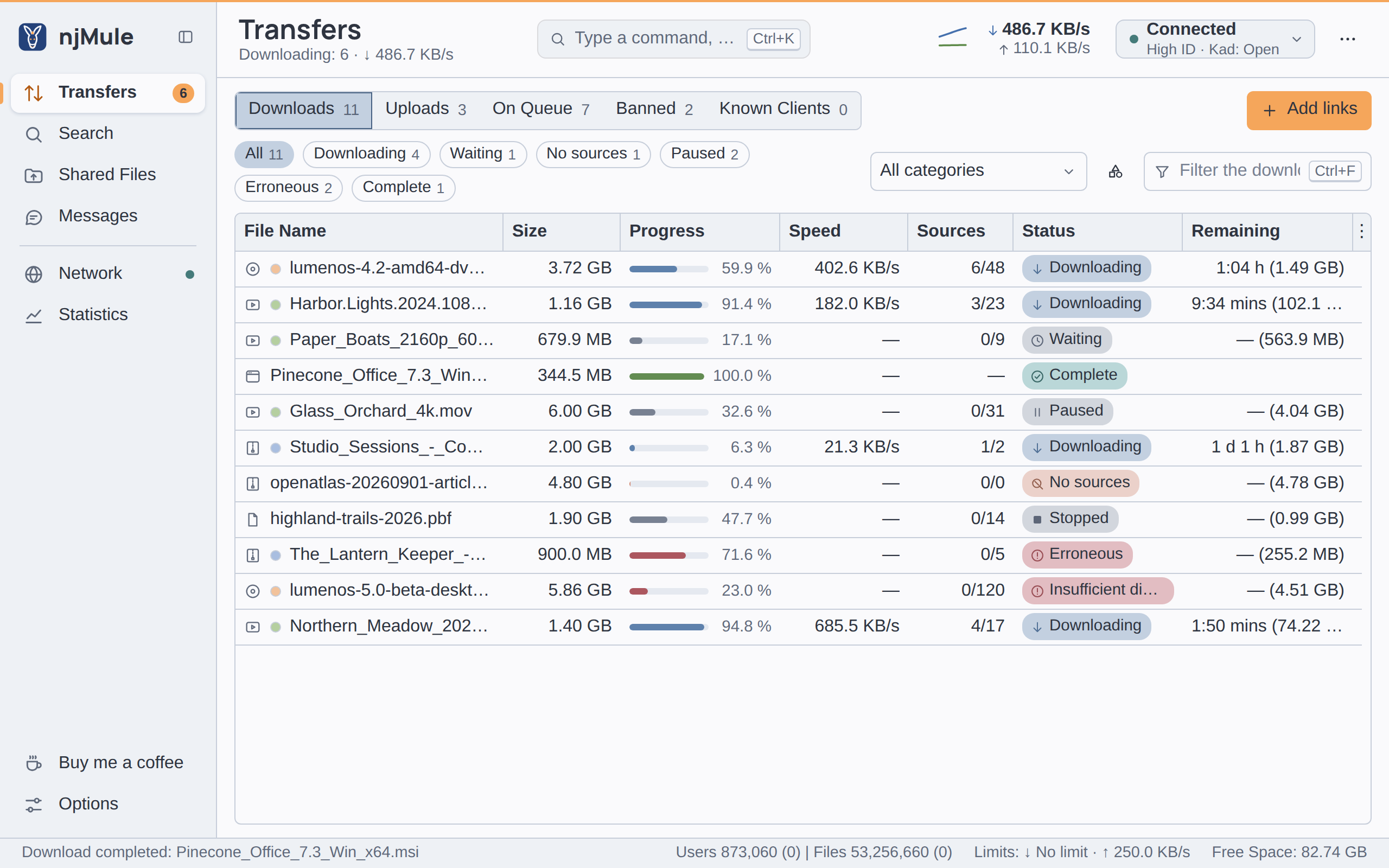
njMule has one interface, written in Vue 3 and TypeScript in the njmule-ui project. The desktop
window, a Tauri shell, shows it in the system's web view and starts the engine beside it; the web
interface (njmule-http) serves it to browsers behind its login page. The interface holds no
engine logic: it calls the remote-control API and shows what it answers, the same
way in both.
Stack and layout
| Part | What it uses |
|---|---|
| Framework | Vue 3; in a browser the place shown follows the address after the # (#/transfers), so the page stays at whatever address a reverse proxy gives it |
| Components | Reka UI for dialogs, menus, popovers and tooltips; TanStack Table and TanStack Virtual for the lists; components of its own for the rest |
| API | openapi-typescript makes the API's types from openapi.yaml, openapi-fetch calls it, eventsource-parser reads its events |
| Language | TypeScript in strict mode, checked by vue-tsc |
| Bundler | Vite, with relative paths everywhere (base: './') |
| Tests | Vitest on happy-dom |
| Formatting | Prettier |
The project holds the sources in src/, the translations in i18n/
(Translations) and the country flags in flags/, PNG files made by
tools/FlagGen.java. The sources:
| Path | Content |
|---|---|
main.ts, App.vue, places.ts | the start, the window's frame and the places of the sidebar |
platform.ts, desktop.ts | what differs between the desktop window and a browser page; the desktop window's calls to its shell |
api/ | client.ts, the calls to the remote-control API, and events.ts, its events |
model/engine.ts | the engine's state the screens show, read through the API and kept current by its events |
screens/ | one component per place: transfers, search, shared files, messages, network, statistics, options |
dialogs/ | the dialogs: adding links, categories, the import from eMule, the first-run wizard, another computer's njMule, the update… |
shell/ | the frame's parts: sidebar, top bar, status strip, command palette, notifications |
ui/ | the shared components: the data table, icons, part bars, rate graphs, switches… |
popups/ | the menu of the tray icon and MiniMule, small windows of the desktop shell |
i18n.ts, language.ts | the languages and the texts |
icons.ts, file-icons.ts | the line icons, and the icons of the kinds of files |
role.ts | what a guest may open |
theme.ts, styles/ | the theme chosen; themes.css, the themes' colours, and njmule.css, njMule's tokens and styles |
__tests__/ | the Vitest tests |
How Gradle builds it
Gradle downloads the pinned Node.js, checks it against its SHA-256, and runs npm ci from
package-lock.json without running any package's install scripts
(Dependencies). Then:
| Task | What it does |
|---|---|
:njmule-ui:bundle | generates the API's types from openapi.yaml into build/generated/api.d.ts, checks the types (vue-tsc) and bundles the interface with Vite into build/dist, with THIRD-PARTY.md, the licenses of every bundled package |
:njmule-ui:translations | converts the texts of i18n/ the interface uses into one JSON file per language, build/translations/i18n/<tag>.json |
:njmule-ui:flags | copies the country flags of flags/ |
:njmule-ui:compress | gzips the text files (JavaScript, CSS, SVG, JSON, Markdown) at the highest level into build/shipped, for the web interface; the page itself stays as it is, since the server fills it in |
:njmule-ui:site | puts the bundle, the translations and the flags, uncompressed, in build/site, for the desktop shell |
:njmule-ui:unitTest | runs the Vitest tests (npm run test) |
:njmule-ui:formatCheck | checks the Prettier formatting (npm run lint) |
assemble runs compress and site, and check runs unitTest and formatCheck, so
./gradlew build covers them all. njmule-http takes the result of compress into its jar, under
org/njmule/http/app; :njmule-desktop:shell embeds the result of site, which
src-tauri/tauri.conf.json names as its frontendDist.
The web interface reads those files once and keeps them. It sends the gzipped files as they are to
browsers that accept gzip and unpacks them for any client that does not. For each session it fills
two meta tags into the page: njmule-csrf, the session's form token, and njmule-role, which is
guest for a guest.
Formatting and types
Format the sources with Prettier before you commit, from njmule-ui:
npm run format
Use the Node.js Gradle downloaded (njmule-ui/.gradle/nodejs/node-v…/, with npm inside) or your
own Node.js 24 or newer. Prettier writes 120 columns, 4 spaces, single quotes and LF line endings.
The TypeScript configuration is strict, with noUncheckedIndexedAccess and no unused locals or
parameters: ./gradlew :njmule-ui:bundle reports what vue-tsc finds. npm run api makes the
API's types alone, for your editor, after a change of openapi.yaml.
Talking to the API
src/api/client.ts is the only door to the engine: a typed client of the API, whose paths and
schemas come from openapi.yaml, so that a call the document does not describe fails the type
check. How the interface proves itself depends on where it runs (platform.ts):
- In a browser, every call goes to
api/v1/…, relative to the page, with the session cookie (same-origin). Every change (any method butGET) carries the session's token from thenjmule-csrfmeta tag in theX-NjMule-CSRFheader, which no page of another site can send. A 401 answer means the session ended: the page goes back to the login page. The page needs no API token: the web interface lets a logged-in session call the API whether or not the token API (--webui-api) is on. - In the desktop window, the shell starts the engine with a control endpoint: the engine answers
on the loopback address, at a free port, only the token made for this run, which it prints for the
shell (
ControlEndpointinnjmule-http). The interface sends that token as a bearer token, and no cookie. A window on another computer's njMule uses that njMule's API token the same way.
An error answer's error field becomes an ApiError whose message is meant for the user.
model/engine.ts reads the engine at fixed paces (the status and the downloads every second, the
servers every ten seconds, and so on), and each screen reads what it shows while it is open. The
engine's events keep the state current between two readings: api/events.ts follows
api/v1/events as server-sent events, read with fetch so that the desktop window's token can go
in a header, and reconnects by itself; after a break the screens read everything again.
In the desktop window
platform.ts tells where the interface runs: in the desktop shell's web view, or in a browser. In
the desktop window, desktop.ts reaches the shell through Tauri's invoke for what a page cannot
do: folder and file choosers, eD2K links the system hands over, the tray icon's menu and MiniMule,
notifications and sounds, the system's icons of the kinds of files, the clipboard and its watch,
the options only the shell applies (start minimised, hide in the notification area, ask before
quitting, watch the clipboard: desktop-options.ts), opening files and folders and starting the
preview player (files.ts, only while the engine runs on the same computer), and windows on
another computer's njMule. In a browser the same calls do nothing or answer that they cannot, so a
screen asks the platform before it offers them: a browser types the paths and shows the shell's
options disabled. The tray's menu and MiniMule are small windows of the shell showing one view of
the interface, chosen by ?view= in their address (popups/).
Texts and languages
The interface's texts are the keys of its translations, t('IDS_…') for the texts taken from eMule
and t('nj.…') for njMule's own (Translations).
- The
translationstask scans the.tsand.vuefiles for literal keys in quotes and keeps only those in the JSON files. A key built at run time (t('nj.mode.' + mode)) is not found: write every key in full somewhere in the sources, assettings.tsdoes in its tables. - An unknown key shows itself in brackets,
[nj.some.key], so that it is noticed. - The texts keep Java's placeholders (
%s,%d,%.1f,%1$s,%%), whichformat()ini18n.tsfills in. - The language is the one chosen in the options, or the best match of the system's or the browser's
languages among
LANGUAGESini18n.ts, with English as the fallback of every text. Arabic, Persian and Hebrew set the page right to left.
Icons
src/icons.ts holds njMule's line icons as SVG path data on a 24 by 24 grid, drawn with a round
1.75 stroke; an icon marked filled is painted instead, and one marked directional is mirrored in
right-to-left languages. Use them through the Icon component (<Icon name="FILE" />). This site
draws the same file with a component of its own, NjIcon.
Colours
The only colour literals of the interface are in src/styles/: themes.css holds the colours of
each theme as --color-* custom properties, converted once from the AtlantaFX 3.0.0 themes (MIT),
one rule per theme, and njmule.css holds njMule's --nj-* tokens, with a light and a dark value
each and the system's colours under forced colours. theme.ts applies the theme chosen, Nord
following the system's light or dark by default. Components use the --color-* and --nj-*
variables only; the rules are in Code style.
The guest role
The web interface can have a second password, for guests who may only look
(Guest access). A guest's page has njmule-role set to guest, which guest
in role.ts reads:
- the server enforces the role whatever the page does: a guest's API calls may only read the
transfers, the searches made, the servers, Kad and the statistics, and follow the events of the
engine's start and stop, servers, searches, downloads and disk space (
GUEST_READSandGUEST_EVENTSinRemoteApi,njmule-core); any other call answers 403; - the interface never opens the first-start wizard for a guest, disables the wizard and the import
from eMule, and shows nothing of updates.
GUEST_PLACESandallowed()inrole.tsname the places a guest may open (the transfers, the searches, the network without its log, the statistics), but the sidebar does not use them yet: a guest's page shows every place and control, and the server refuses what they would change.
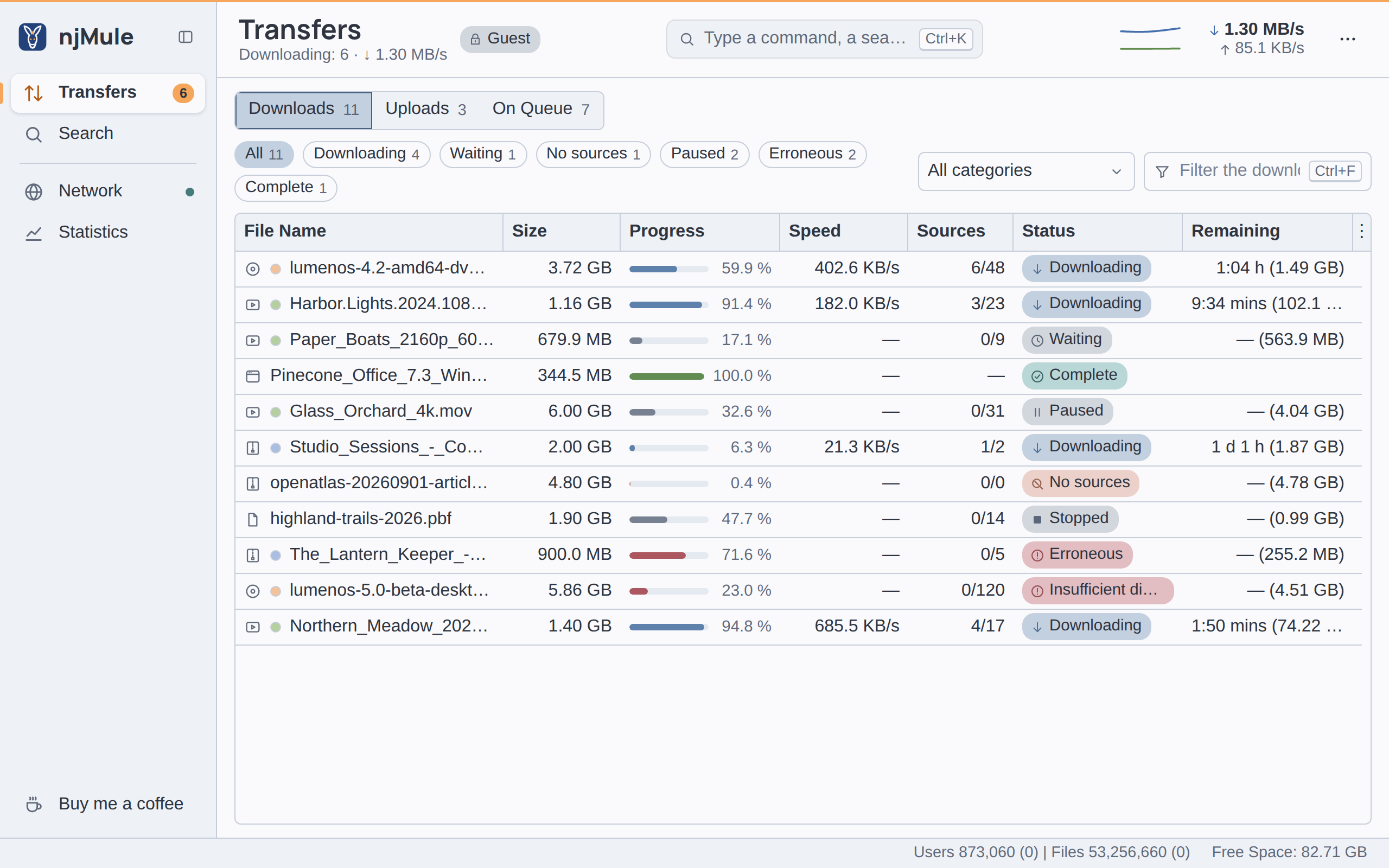
When you add a screen or a control, decide what a guest sees, and keep the server's list in
RemoteApi in step with role.ts. A few calls answer only the desktop window on njMule's own
computer (LOCAL_ONLY in RemoteApi): the web interface's options, the API token, and whether
njMule starts at login and opens the eD2K links; a browser shows those options disabled.
Working on the interface
On example data. The demo engine that makes this site's pictures serves the interface built by Gradle through a web interface of its own, with no network and nothing of your profile:
./gradlew :njmule-http:webCaptureArgs
java @njmule-http/build/web-capture/java.args
The first command builds everything the interface needs and writes the arguments file; run the
second with a Java 25 java (the one njmule-http/build/web-capture/launcher.json names, for
example). It prints one line of JSON with the address, the password and the guest password, then
serves until its standard input closes: press Ctrl+D (on Windows
Ctrl+Z then Enter). Run both commands again after each change.
With Vite's development server. npm run dev in njmule-ui serves the sources as they are and
reloads the page as you save. It needs an engine that answers the API with a token, and the
translations and flags the build makes. Start the demo with the desktop window's control endpoint
instead of the web interface:
./gradlew :njmule-http:webCaptureArgs :njmule-ui:translations :njmule-ui:flags
java -Dnjmule.capture.control=true @njmule-http/build/web-capture/java.args
It prints the endpoint's address and token, {"url":"http://127.0.0.1:<port>/api/v1","token":"…"}.
Then, in njmule-ui, point Vite at that port and give the page the token:
- Bash
- PowerShell
NJMULE_API=http://127.0.0.1:<port> VITE_NJMULE_TOKEN=<token> npm run dev
$env:NJMULE_API = 'http://127.0.0.1:<port>'; $env:VITE_NJMULE_TOKEN = '<token>'; npm run dev
Vite passes the page's /api calls to the engine. A Gradle task that runs npm ci empties
node_modules: stop the development server first.
With a real engine. Start the headless engine with a password file and a profile of its own,
then open http://localhost:4711/:
./gradlew :njmule-app:run --args="--config-dir /home/you/njmule-dev --webui-password-file /home/you/njmule-dev/password.txt"
This engine connects to the eD2K and Kad networks like any njMule. To see the interface in the desktop window, build the shell (Building).
Related pages
- Remote-control API: every call the interface makes.
- Translations: where the interface's texts come from.
- Testing: the Vitest tests.
- Web interface overview and the main window in the user guide.